• Welcome to the Chevereto User Community!

    Here, users from all over the world come together to learn, share, and collaborate on everything related to Chevereto. It's a place to exchange ideas, ask questions, and help improve the software.

    Please keep in mind:

    • This community is user-driven. Always be polite and respectful to others.
    • Support development by purchasing a Chevereto license, which also gives you priority support.
    • Go further by joining the Community Subscription for even faster response times and to help sustain this space
  • Chevereto Support CLST

    Support response

    Support checklist

    • Got a Something went wrong message? Read this guide and provide the actual error. Do not skip this.
    • Confirm that the server meets the System Requirements
    • Check for any available Hotfix - your issue could be already reported/fixed
    • Read documentation - It will be required to Debug and understand Errors for a faster support response

Virus in my chevereto installation

Status
Not open for further replies.

gustavorwm

Chevereto Member
I don't know much about this, but my VPS stopped working, I contacted my VPS administrator and he told me that the DATA CENTER told him that there was Pishing on my Chevereto installation.

Datacenter:
Below is the list of URLs that point to the phishing web page you are hosting:

* hxxpx: / / tibiagallery [.] com / images / 2020 / [.] progress / index [.] php? email =

▶ Reproduction steps
😢 Unexpected result

All the sites that are hosted on the Vps stopped working.

📃 Error log message

LOG ATTACH


📃 Temporary solution

My system administrator reported that a virus entered 7 hours ago, and I add these lines to the htaccess file to stop it.

<FilesMatch "^ \.">
Order allow, deny
Deny from all
</FilesMatch>

Sorry for my bad English.
 

Attachments

We are willing to cooperate with your investigation and if this is affecting other users let me know.
 
Perdona que escriba en español, pero no quiero a darme a entender mal al escribir en ingles.

A mi lo que me preocupa es que exista alguna vulnerabilidad en Chevereto, mi administrador de sistemas me informo que tiene una vulnerabilidad y que ingreso un virus al VPS por el script.

¿Me podrias orientar a que medidas tomar?

Las acciones que se tomaron fue evitar que abran folders ocultos, pero no se si eso sea suficiente.

Mi instalacion de Chevereto es normal, no tiene modificaciones de codigo ni nada raro.

Gracias por tu tiempo.
 
How these files end up in a directory may vary, is not that relevant at this point. What is important is to deny .php interpreter in paths for public uploads:

images/.htaccess
Apache config:
<LimitExcept GET>
    <IfModule !mod_authz_core.c>
        Order Allow,Deny
        Deny from all
    </IfModule>
    <IfModule mod_authz_core.c>
        Require all denied
    </IfModule>
</LimitExcept>
<FilesMatch "\.(?:[Pp][Hh][Pp][345]?|[Pp][Hh][Tt][Mm][Ll])|(html?)$">
    <IfModule !mod_authz_core.c>
        Order Allow,Deny
        Deny from all
    </IfModule>
    <IfModule mod_authz_core.c>
        Require all denied
    </IfModule>
</FilesMatch>
<IfModule mod_php7.c>
    php_flag engine off
</IfModule>
<FilesMatch ".+\.*$">
    SetHandler !
</FilesMatch>
<IfModule mod_rewrite.c>
    RewriteRule ^.*\.php$ - [F,L]
</IfModule>

The above hardens Apache HTTP Server (2.2 and 2.4) in several ways:
  1. Limits requests only for GET/HEAD so any other type of request is forbidden, including POST.
  2. Removes any kind ot PHP-like file to be executed by the Apache HTTP Server (.php, .php3, .php4, etc.)
  3. Explicitly removes PHP when running as php_mod
  4. Finally, for all files existing there it will remove any server-side handle. It will only serve static content and if any script sneaks in it will just print the file contents to the screen.
This should work for Apache HTTP server running as php_mod and PHP-FPM.

You can use this command to locate .php files in the current path (ie at images):

Code:
grep -r -H "<?php" *

Code:
find . -type f -name  "*.php*"

Code:
grep -r -H "eval" *

I've noticed that the above restrictions are outdated in the software, I will patch these for the next revision.

Update

If you are paranoid about this, you can add the following configuration for your websites:

(goes inside <VirtualHost>)
Apache config:
<Directory /var/www/html/images>
    AllowOverride None
    <LimitExcept GET>
        <IfModule !mod_authz_core.c>
            Order Allow,Deny
            Deny from all
        </IfModule>
        <IfModule mod_authz_core.c>
            Require all denied
        </IfModule>
    </LimitExcept>
    <FilesMatch "\.(?:[Pp][Hh][Pp][345]?|[Pp][Hh][Tt][Mm][Ll])|(html?)$">
        <IfModule !mod_authz_core.c>
            Order Allow,Deny
            Deny from all
        </IfModule>
        <IfModule mod_authz_core.c>
            Require all denied
        </IfModule>
    </FilesMatch>
    <IfModule mod_php7.c>
        php_flag engine off
    </IfModule>
    <FilesMatch ".+\.*$">
        SetHandler !
    </FilesMatch>
    <IfModule mod_rewrite.c>
        RewriteRule ^.*\.php$ - [F,L]
    </IfModule>
</Directory>
 
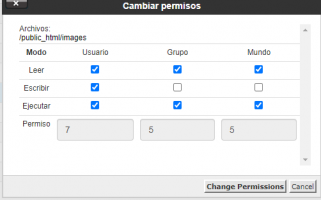
Let me guess... 0777 permissions on the upload path?
it seems the installer.php does chmod images folder by default to 777, since i checked mine and i see alot of folders are 777 which i have not done myself. So only thing could be because i used web installer.php instead of .zip.

But good question how his site got such thing anyway, never seen chevereto site getting this before.
 
It could be more sophisticated than just a permissions issue.

I was able to detect malicious files uploaded to the demo and for what I've been investigating there have been a myriad of security issues that could explain this: https://www.cvedetails.com/vulnerability-list/vendor_id-74/product_id-128/PHP-PHP.html

My recommendations are:
  • Harden your directories to prevent executing .php in upload paths
  • Update your servers with the latest PHP 7.4 libs
  • Use Imagick instead of GD
  • Disable the remote upload functionality
If you find malicious files send me those as there could be more than one attack vector and the only way to know is by having more data to analyze. If you detect malicious files:
  • Revoke all your service passwords (external storage & email)
I've restricted access to bug reporting only to clients from now to avoid leaking extra sensitive information to malicious parties as we never got a CVE report for this.
 
I have few questions.

1) All my external FTP doesn't have PHP installed. In such a situation, is it possible to get affected by the above-discussed issue?
2) I can see in the web upload, it is not allowing any other extensions other than images. Isn't possible to have the same set of restriction in remote upload as well? Because remote upload allows clients to easily move from their existing source to a new house.
 
I have few questions.

1) All my external FTP doesn't have PHP installed. In such a situation, is it possible to get affected by the above-discussed issue?
2) I can see in the web upload, it is not allowing any other extensions other than images. Isn't possible to have the same set of restriction in remote upload as well? Because remote upload allows clients to easily move from their existing source to a new house.
if I remember it right, there is a security flaw that has happened years ago. Is that you can manipulate a php file into a jpg or another image format so when jpg file is uploaded it converts from jpg into a php and that's when it becomes malicious and can be executed. But if you have right security in your php coding and PHP version is patched against this, then these files will stay as jpg and won't turn into php. That means it failed to turn into the .php malicious file. So far this has not happened to me yet.
 
1) All my external FTP doesn't have PHP installed. In such a situation, is it possible to get affected by the above-discussed issue?
To be affected, the files must be in the same server where you have your installation. When that happens, these files may act as backdoor if PHP interpreter isn't disabled for that content. You may want to run the command above to detect malicious PHP files in your /images and /content/images folders.

2) I can see in the web upload, it is not allowing any other extensions other than images. Isn't possible to have the same set of restriction in remote upload as well?
There's a vulnerability on the remote upload functionality as attackers can sneak code in the exif metadata and use ncat (or other tools installed in your server) for such purpose. I will remove the remote upload functionality until we find a safer way to get that going (we will need a proxy server for securely handle those).

@JakeSully Plenty attack vectors have been patched in V3.20.X updates, but that started to roll from May 2021. Far as I've been able to investigate, the software vulnerable status was old as March 2021 and I haven't detected more recent incidents.
 
I will remove the remote upload functionality until we find a safer way to get that going (we will need a proxy server for securely handle those).

It will be much better to release a warning for users about the remote upload and the issue instead of removing it completely. If people really need it, they will enable it. If not they can always turn off the feature.

For example, I won't be affected by this bug as I store images in external FTP and so I can use remote upload features which is the most used feature of all my users.

I am sure there will be 1000s like me who want this and have a good setup.
 
I am sure there will be 1000s like me who want this and have a good setup.
The remote upload functionality is a risk for everyone, regardless where you end up uploading those. To get started, it can leak your server IP instantly and as we don't control the infra where this get installed, is better safe than sorry.
 
@Rudolfo, i have 8 files from 2019, september to november that match with the eval (grep -r -H "eval" *) search string.
But all 8 files are jpg or png picture files. Is that a problem?
They look like normal pictures?
 
@BlackCrow
But all 8 files are jpg or png picture files. Is that a problem?
They look like normal pictures?
There are several ways in which people may try to exploit the system, one of these is to sneak <?php at image files. What you need to know is that those images represent a malicious attempt and that people doing that are trying to enter your system.

They do that seeking that your /images dir executes those images as PHP which you can avoid implementing the above .htaccess hardening.
 
I have already changed the .htaccess according to your suggestion.
I could not find any malicious code in the mentioned image files.
I think in the 8 images the string occurred rather randomly in the binary code
 
Status
Not open for further replies.
Back
Top