• Welcome to the Chevereto User Community!

    Here, users from all over the world come together to learn, share, and collaborate on everything related to Chevereto. It's a place to exchange ideas, ask questions, and help improve the software.

    Please keep in mind:

    • This community is user-driven. Always be polite and respectful to others.
    • Support development by purchasing a Chevereto license, which also gives you priority support.
    • Go further by joining the Community Subscription for even faster response times and to help sustain this space
  • Chevereto Support CLST

    Support response

    Support checklist

    • Got a Something went wrong message? Read this guide and provide the actual error. Do not skip this.
    • Confirm that the server meets the System Requirements
    • Check for any available Hotfix - your issue could be already reported/fixed
    • Read documentation - It will be required to Debug and understand Errors for a faster support response

Upload file location

Version
Latest
Website URL
https://allthepics.net
PHP version
7.3
Database driver
MySQL
Database version
latest
Web browser
all

Barry

πŸ’– Chevereto Fan
Hey guys.

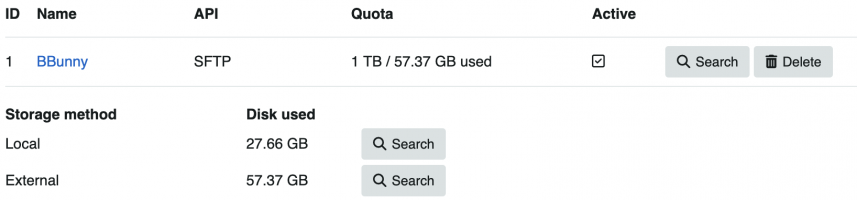
I only have SFTP enabled as the only externa storage, and this has been working fine until sometime in March, when uploads stopped going to SFTP, and started going to local.

I noticed today that my license key was not applied, so I added the license key, re-added the SFTP config, and tested. Still, uploads are going to local storage instead of the SFTP that is configured as the only active storage upload.

What could be going on here?

Screenshot 2026-04-26 at 4.03.41β€―PM.png
 
Oh so maybe it's not just my install bugged then xD I only have SFTP enabled, I also had to re-apply my licence key on my buggy v4.5.2.

I even added a new storage with the same SFTP settings deactivated the older and tried the newly added but still when to local.

I have kinda gave up and reverted to v4.0.12 missing so many features and UI improvements but for the life of me the upgrade just won't go smooth. I even tried a manual 4.1.0 upgrade instead of a jump to v4.5.2 no joy.

Following thread
 
OK, so two of us with the same issue. @Rodolfo thoughts on this?
I'm trying to test this again to make sure I can repeat the bug and if any errors log - I have copied my entire public_html folder and database to a sub-domain on v4.0.12 and used the dashboard Update button. Update says success + Chevereto database has been updated.

However, for some reason it's reverted me to Chevereto Lite/free weren't domain restrictions lifted (not require a dev licence anymore)?

However, can't login to apply ?licence due to "You either don't have permission to access this page or the link has expired." a search of the forums shows its been mentioned previously and about /tmp but sessions are working elsewhere on main website and from some AI provided tests. I assume the database has session cache or some kind I need to "flush" since its moved? Cloudflare is DNS only for the subdomain.

EDIT 10:24β€―PM Tuesday, April 28, 2026 (GMT+1):
Okay, so it seems connecting to a VPN (Proton) fixed the "You either don't have permission to access this page or the link has expired" error so I guess it cached? Even though I purged DNS, change DNS provider, flush cached etc. Not sure how that'd work for all my users/visitors though? Tell them to get on a VPN to login? Maybe be fine once I move it to root website.

However, I can confirm it is again still using local storage not active SFTP and storing locally on cPanel via /u/2026/04/28/ despite the same active SFTP setting and setup as the main website (which works). It falls to the "CDN" if enabled via Dashboard => System => CDN too. Not my SFTP CDN. Same for Site Storage if I try and use SFTP there.

Rodolfo is welcome to go on my dev branch site to see/test if he wants.

That confirms my Chevereto Upgrade (v4.0.12 > v4.5.2) didn't break by me attempting to enable encryption SFTP in 4.5.2 is actually broken/bugged?

I also noticed when you modify a setting on v4.0.12 (say you decide to stop allow JPG extension) it says "Changes have been saved." yellow alert, on v4.5.12 it doesn't but does still save/submit. Is that a design/UI change?
 
Last edited:
Installations don't revert to free edition on free will, it happened because you didn't configure the license key in the panel. If your version predates back the introduction of the setting key value, then you need to manually update it first, then add the license key to get that thing working.
 
Installations don't revert to free edition on free will, it happened because you didn't configure the license key in the panel. If your version predates back the introduction of the setting key value, then you need to manually update it first, then add the license key to get that thing working.
Wouldn't my licence already be set and configured from v4.0-v4.0.12 tho? As that edition has been active licence (since purchase) for years? Or was something changed after 4.0.12 to require reapplying?

Anyway, Yes I did update => re-add licence and all features unlocked again. Just broken SFTP I believe everything else is working flawless.

* Tried my Linux VPS + Contabo both "Active" but still insists on using Local. @Barry seems to be using Bunny though as per SS.
 
Claude was able to fix this issue for me.

app/src/Legacy/Classes/Image.php:1014.


Find:

Code:
                if (! in_array($get_active_storage['api_id'], $enabled_storage_apis, true)) {

Replace with:
Code:
                if (! in_array((int) $get_active_storage['api_id'], $enabled_storage_apis, true)) {

Tested and worked, no idea if this is the proper way but it works for now! As always It's AI and AI can make mistakes but I needed a temp-fix.

Fetch thread first. Load WebFetch.

Now inspect storage selection code. Find it.

Read core storage-picking logic. Upload.php and Storage.php key.

Now find how upload picks which storage. Check Image.php upload path.

Read Image.php storage-selection block.

Check StorageApis::getEnabled() and getApiType β€” the enabled filter at Image.php:1012-1017 could drop SFTP.

Check storages schema (type_chain default) and how DB::get applies & operator.

SFTP config exists but files go local. Check self::upload() β€” does it swallow SFTP failure and fall back to local?

Read SFTP class implementation.


Strong lead: strict in_array at Image.php:1014 with array_keys() (ints) vs api_id from DB. If DB returns api_id as string, strict compare fails β†’ storage unset β†’ local. Verify how DB types api_id.


Confirmed root cause. Let me verify the exact line for the fix.


Found bug. Root cause:


Type-strict​


File: app/src/Legacy/Classes/Image.php:1014


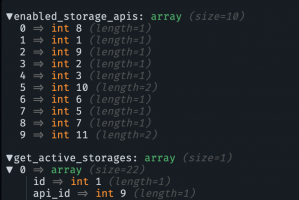
$enabled_storage_apis = array_keys(StorageApis::getEnabled()); // integer keys: [8,1,9,2,3,10,6,5,7,11]
foreach ($get_active_storages as $i => $get_active_storage) {
if (! in_array($get_active_storage['api_id'], $enabled_storage_apis, true)) { // STRICT
unset($get_active_storages[$i]);
}
}


Chain:


  1. DB connect sets PDO::ATTR_EMULATE_PREPARES = true (DB.php:125), and STRINGIFY_FETCHES never disabled β†’ PDO returns all columns as strings. api_id = "6", not 6.
  2. formatRow() (DB.php:634) does no type casting β†’ api_id stays string "6".
  3. StorageApis::$apis keyed with integer literals β†’ array_keys(getEnabled()) = ints.
  4. in_array("6", [6,5,8,...], true) β€” strict β†’ "6" !== 6 β†’ returns false β†’ !false = true β†’ storage unset.
  5. Every active storage stripped β†’ $get_active_storages === [] β†’ block at Image.php:1018 skipped β†’ $storage_id stays null.
  6. Null storage_id β†’ no Storage::uploadFiles(), local files never removed (Image.php:1441-1444). File stays local /u/2026/....

Why matches thread:


  • Not SFTP-specific β€” kills S3/CDN too (Mortgage's "broader storage selection malfunction"). βœ“
  • Regression vs 4.0.12 (that filter/strict-flag didn't exist) β†’ downgrade fixes. βœ“
  • No error thrown, silent local fallback. βœ“
  • is_active=1, only-SFTP config, still local. βœ“

The getEnabled()-based filter (id 6 SFTP present in keys regardless of edition) is a red herring β€” the strict comparison fails before edition logic matters, on the string-vs-int mismatch alone.


Fix​


Cast api_id to int (keep strict compare):


if (! in_array((int) $get_active_storage['api_id'], $enabled_storage_apis, true)) {

Same string-vs-int pattern worth auditing elsewhere (any strict in_array / === on DB numeric columns given emulated-prepares stringing).


Want me to apply the one-line fix, or grep for sibling occurrences of the same string/int strict-compare pattern first?


One line. app/src/Legacy/Classes/Image.php:1014.

Replace:

if (! in_array($get_active_storage['api_id'], $enabled_storage_apis, true)) {

With:
if (! in_array((int) $get_active_storage['api_id'], $enabled_storage_apis, true)) {

Added (int) cast. api_id string "6" β†’ int 6, matches integer array_keys(). Storage no longer wrongly unset.


Apply it?
 
@Mortgage What claude epic fails to reason is why the heck it needed the inline casting to int, and to warn you about all the massive implications of it.

Basically, the problem is that your website is using the the old (deprecated) mysql driver for PHP, which reads everything as strings. That affects and concerns the entire system, not just the upload file location.

You must use the mysql nd driver, otherwise you will need to patch a lot of files across the source code. Of course, that means more work to Claude so it suggested you the weakest solution.
 
Back
Top