Fetch thread first. Load WebFetch.
Now inspect storage selection code. Find it.
Read core storage-picking logic. Upload.php and Storage.php key.
Now find how upload picks which storage. Check Image.php upload path.
Read Image.php storage-selection block.
Check StorageApis::getEnabled() and getApiType — the enabled filter at Image.php:1012-1017 could drop SFTP.
Check storages schema (type_chain default) and how DB::get applies & operator.
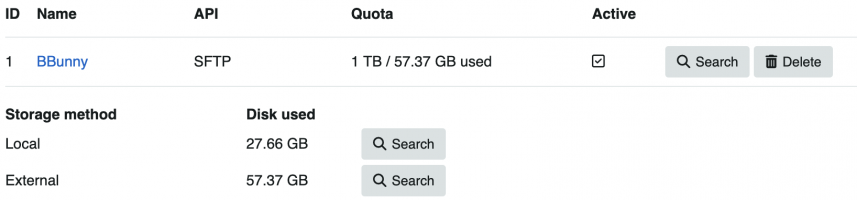
SFTP config exists but files go local. Check self::upload() — does it swallow SFTP failure and fall back to local?
Read SFTP class implementation.
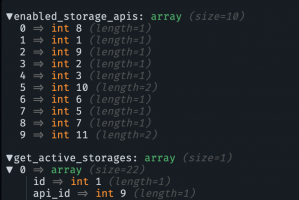
Strong lead: strict in_array at Image.php:1014 with array_keys() (ints) vs api_id from DB. If DB returns api_id as string, strict compare fails → storage unset → local. Verify how DB types api_id.
Confirmed root cause. Let me verify the exact line for the fix.
Found bug. Root cause:
Type-strict
File: app/src/Legacy/Classes/Image.php:1014
$enabled_storage_apis = array_keys(StorageApis::getEnabled()); // integer keys: [8,1,9,2,3,10,6,5,7,11]
foreach ($get_active_storages as $i => $get_active_storage) {
if (! in_array($get_active_storage['api_id'], $enabled_storage_apis, true)) { // STRICT
unset($get_active_storages[$i]);
}
}
Chain:
- DB connect sets PDO::ATTR_EMULATE_PREPARES = true (DB.php:125), and STRINGIFY_FETCHES never disabled → PDO returns all columns as strings. api_id = "6", not 6.
- formatRow() (DB.php:634) does no type casting → api_id stays string "6".
- StorageApis::$apis keyed with integer literals → array_keys(getEnabled()) = ints.
- in_array("6", [6,5,8,...], true) — strict → "6" !== 6 → returns false → !false = true → storage unset.
- Every active storage stripped → $get_active_storages === [] → block at Image.php:1018 skipped → $storage_id stays null.
- Null storage_id → no Storage::uploadFiles(), local files never removed (Image.php:1441-1444). File stays local /u/2026/....
Why matches thread:
- Not SFTP-specific — kills S3/CDN too (Mortgage's "broader storage selection malfunction"). ✓
- Regression vs 4.0.12 (that filter/strict-flag didn't exist) → downgrade fixes. ✓
- No error thrown, silent local fallback. ✓
- is_active=1, only-SFTP config, still local. ✓
The getEnabled()-based filter (id 6 SFTP present in keys regardless of edition) is a red herring — the strict comparison fails
before edition logic matters, on the string-vs-int mismatch alone.
Fix
Cast api_id to int (keep strict compare):
if (! in_array((int) $get_active_storage['api_id'], $enabled_storage_apis, true)) {
Same string-vs-int pattern worth auditing elsewhere (any strict in_array / === on DB numeric columns given emulated-prepares stringing).
Want me to apply the one-line fix, or grep for sibling occurrences of the same string/int strict-compare pattern first?