• Welcome to the Chevereto User Community!

    Here, users from all over the world come together to learn, share, and collaborate on everything related to Chevereto. It's a place to exchange ideas, ask questions, and help improve the software.

    Please keep in mind:

    • This community is user-driven. Always be polite and respectful to others.
    • Support development by purchasing a Chevereto license, which also gives you priority support.
    • Go further by joining the Community Subscription for even faster response times and to help sustain this space
  • Chevereto Support CLST

    Support response

    Support checklist

    • Got a Something went wrong message? Read this guide and provide the actual error. Do not skip this.
    • Confirm that the server meets the System Requirements
    • Check for any available Hotfix - your issue could be already reported/fixed
    • Read documentation - It will be required to Debug and understand Errors for a faster support response

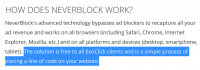
NeverBlock with Chevereto

Taken from https://www.neverblock.com/

1577979076248.png

They don't specify language, so I assume that is just HTML markup. In that case, you have to use theme hooks (to add arbitrary code into the html) https://chevereto.com/docs/theme

An easy way to achieve it without touching the files could be simply put the "line of code" in a banner placement. Doesn't matter if the ad slot is already used, is just markup so it will work.
 
  • NeverBlock PHP - The standard solution, easiest to implement and most commonly used. It will be covered most extensively in this documentation.
  • NeverBlock API - When an unsupported language is required, the API provides endpoints required to get the advertisements directly. To be used when manual solutions are requried.
  • NeverBlock Proxy - A cross platform application with the purpose of handling API requests and caching of advertisements. This service runs in the background to provide the user with a more direct endpoint through which to fetch advertisements.
  • WordPress Plugin - A WordPress plugin developed to easily integrate NeverBlock ad zones into your WordPress site.
They have these options!
 
Can you post the instructions of the NeverBlock PHP? I wasn't able to find anything about it.
 
For what I can see, both NeverBlock PHP and NeverBlock Proxy are the easiest one to setup and you should try installing any of these (in your server). I'm afraid that I can't assist you further in this regard as it requires its own installation process and it will be better if you refer your concerns about it to the software vendor.

Once you get NeverBlock installed in your server, you have to modify your ad code script per their instructions. Only then you will have the ad codes needed for Chevereto which you only need to copy-paste in the banner section of your dashboard settings.

Dashboard > Settings > Banners
 
Back
Top