• Welcome to the Chevereto User Community!

    Here, users from all over the world come together to learn, share, and collaborate on everything related to Chevereto. It's a place to exchange ideas, ask questions, and help improve the software.

    Please keep in mind:

    • This community is user-driven. Always be polite and respectful to others.
    • Support development by purchasing a Chevereto license, which also gives you priority support.
    • Go further by joining the Community Subscription for even faster response times and to help sustain this space
  • Chevereto Support CLST

    Support response

    Support checklist

    • Got a Something went wrong message? Read this guide and provide the actual error. Do not skip this.
    • Confirm that the server meets the System Requirements
    • Check for any available Hotfix - your issue could be already reported/fixed
    • Read documentation - It will be required to Debug and understand Errors for a faster support response

Image too big

evanclivejones

Chevereto Member
Hi,

When trying to upload images which are more than 2mb, I'm getting the message - File too big.

I've increased the limit in php ini.

Max uploads are set to 128 mb in the Cheverto dashboard, so I'm not sure why this problem is occuring.

  • File uploads:Enabled
  • Max. upload file size:128 MB
  • Max. post size:128 MB
  • Max. execution time:30 seconds
  • Memory limit:192 MB
Any help will be most appreciated.

Thanks

Clive
 
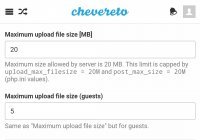
you have to increase size limit in admin panel as well. since you got a setting there set as 2MB change it to limit as your php.ini is, then it should work fine,
 
Keep in mind that Chevereto-Free is provided "as-is". Don't use this forum to request support for that product (FAQ).

Moved to server stuff.
 
You got 2 of the 3 places addressed that control file upload size. You also need to change the max file upload size in your server config as well.
 
I have this issue as well, using Chevereto-Free in a docker container. I do not see anywhere in the "Admin panel" to set size limits. Also, where is "server config"? Thanks!
 
I have this issue as well, using Chevereto-Free in a docker container. I do not see anywhere in the "Admin panel" to set size limits. Also, where is "server config"? Thanks!

Sorry to answer my own question, but this may help future users: the setting is stored in the database table. There appears to be no user interface for the settings. Get the size related settings with: select setting_name, setting_value from chv_settings where setting_name LIKE "%size%";
 
Thank you. I did not notice the tiny down-arrow in the Dashboard,that opens a menu of various tabs.
 
Sorry to answer my own question, but this may help future users: the setting is stored in the database table. There appears to be no user interface for the settings. Get the size related settings with: select setting_name, setting_value from chv_settings where setting_name LIKE "%size%";
How do you did it?? where is it chv_settings?
thanks in advance
 
Back
Top