• Welcome to the Chevereto User Community!

    Here, users from all over the world come together to learn, share, and collaborate on everything related to Chevereto. It's a place to exchange ideas, ask questions, and help improve the software.

    Please keep in mind:

    • This community is user-driven. Always be polite and respectful to others.
    • Support development by purchasing a Chevereto license, which also gives you priority support.
    • Go further by joining the Community Subscription for even faster response times and to help sustain this space
  • Chevereto Support CLST

    Support response

    Support checklist

    • Got a Something went wrong message? Read this guide and provide the actual error. Do not skip this.
    • Confirm that the server meets the System Requirements
    • Check for any available Hotfix - your issue could be already reported/fixed
    • Read documentation - It will be required to Debug and understand Errors for a faster support response

Image link incongnito window

sharemyimage

Chevereto Member
When we share an image link or check an image link in the incognito window, the image does not expand or enlarge. Sometimes an image appears blurry. is there any setting which avoid this problem.
 
I need a link to an image to test, could you check on my support accounts? I made some accounts for support but they seem gone.
 
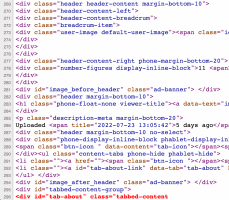
Thanks for reporting this, if you check the source code (from the page view) you will notice this:

1659022639886.png

The code output stops right there in line 296 (it shouldn't happen). Chances are that it is just a type error or something of that sort, I will keep investigating.

From now this is labeled as a bug, but we will keep handling it here (private).
 
Go to app/routes/route.image.php

Find this:

PHP:
$currentTab = [];

Add this below:

PHP:
$handler::setVar('current_tab', G\str_replace_first('tab-', '', $firstTab));

Let me know if it works for you.
 
Back
Top