-
Welcome to the Chevereto User Community!
Here, users from all over the world come together to learn, share, and collaborate on everything related to Chevereto. It's a place to exchange ideas, ask questions, and help improve the software.
Please keep in mind:
- This community is user-driven. Always be polite and respectful to others.
- Support development by purchasing a Chevereto license, which also gives you priority support.
- Go further by joining the Community Subscription for even faster response times and to help sustain this space
-
Chevereto Support CLST
Support response
- Extra Support is delivered within 24-hours.
- Pro Subscription ticket response time is within 7 days on Software Support, Bug Tracking and RFC.
- Bug Tracking requires an active Chevereto self-hosted subscription.
- Community Help is user driven. Be polite with other users and do not expect official support.
Support checklist
- Got a Something went wrong message? Read this guide and provide the actual error. Do not skip this.
- Confirm that the server meets the System Requirements
- Check for any available Hotfix - your issue could be already reported/fixed
- Read documentation - It will be required to Debug and understand Errors for a faster support response
You are using an out of date browser. It may not display this or other websites correctly.
You should upgrade or use an alternative browser.
You should upgrade or use an alternative browser.
Edit & delete button not working on image page.
- Thread starter donniewr
- Start date

Strange.Unable to reproduce.
agree with Rodolfo about this, i also cannot reproduce this. One idea that came up in my mind is check if your host is using mod_security if so then that may be problem to why these buttons may not be working. Since mod_security can block some actions, it has happened to me few times on chevereto and on some other scripts. Where mod_security blocks it and logs it as a inject attempt or something.
So hopefully if your host uses mod_security then check if you can disable it or if you are hosting it yourself, then disable mod_security.
So hopefully if your host uses mod_security then check if you can disable it or if you are hosting it yourself, then disable mod_security.

Point of a bug report is that it is a replicable issue, something that others can say "me too". Here we just have something not working for you, it could be dozen things but certainly it doesn't seem like a bug because you fail to provide the context to replicate the incident.
Most likely you have HTTP cache issues, that's all.
Most likely you have HTTP cache issues, that's all.
There is nothing special to do to replicate the issue, it just appear on all uploaded images pages. And the issue was not present on 3.18.you fail to provide the context to replicate the incident.
I'll try with Chevereto free on another server.
Then it is not a bug as it only affects you.There is nothing special to do to replicate the issue, it just appear on all uploaded images pages. And the issue was not present on 3.18.
Kindly note that it won't help, at all. CHEVERETO FREE is a different codebase.I'll try with Chevereto free on another server.
Rip, I guess I will have to live with it.Kindly note that it won't help, at all. CHEVERETO FREE is a different codebase.
Self-hosted software means that you have to provide the data needed to assist you, otherwise you can either purchase extended support or check our official deploy alternatives. Our official deploy is guarantee to work, we maintain it so we take charge of our stuff. Unfortunately, we can't take charge for other servers/systems not following our official stuff.
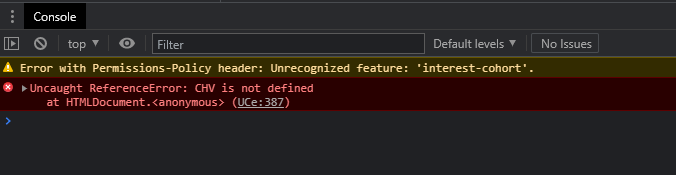
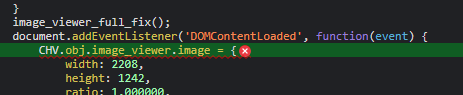
What you are having is either cache, bad editing, some js breaking something... Is relatively easy to solve but you need to show us the URL. If that's not an option I suggest you to learn how to debug the browser console, which will let us know why those assets are missing.
You could also try downloading the release and uploading it directly, that's one quick way to get rid of cache issues without the tech knowledge required for debugging.
What you are having is either cache, bad editing, some js breaking something... Is relatively easy to solve but you need to show us the URL. If that's not an option I suggest you to learn how to debug the browser console, which will let us know why those assets are missing.
You could also try downloading the release and uploading it directly, that's one quick way to get rid of cache issues without the tech knowledge required for debugging.
My software is clean I think, I just did a clean install when 3.20 was released.You could also try downloading the release and uploading it directly,
The issue might come from the control panel I'm using serverpilot.io, it automatically setup any server to have the best performance. They install php-fpm and nginx as an apache reverse proxy for static files.
No, I'm just using Cloudflare.Are you using CDN with different domain name?
ServerPilot should not cause this, maybe some of your CF settings, why not try this
1) disable your CF by clicking on the cloud icon in your A record
2) purge the content from CF
and try whether it solves.
Can you mention your domain name or ping me on private, and so I can take a look and reply over here?
1) disable your CF by clicking on the cloud icon in your A record
2) purge the content from CF
and try whether it solves.
Can you mention your domain name or ping me on private, and so I can take a look and reply over here?
I tried disabling CF and the issue was still there.ServerPilot should not cause this, maybe some of your CF settings, why not try this
1) disable your CF by clicking on the cloud icon in your A record
2) purge the content from CF
and try whether it solves.
Can you mention your domain name or ping me on private, and so I can take a look and reply over here?
Everything looks OK.View the page source, perhaps the code execution is halted. If that's the case you will have a half-empty document.
You should also check the response code for any missing assets.
I just see a red div at the bottom of the source page.
<div id="tab-about" class="tabbed-content
Look like unfinished div.