• Welcome to the Chevereto User Community!

    Here, users from all over the world come together to learn, share, and collaborate on everything related to Chevereto. It's a place to exchange ideas, ask questions, and help improve the software.

    Please keep in mind:

    • This community is user-driven. Always be polite and respectful to others.
    • Support development by purchasing a Chevereto license, which also gives you priority support.
    • Go further by joining the Community Subscription for even faster response times and to help sustain this space
  • Chevereto Support CLST

    Support response

    Support checklist

    • Got a Something went wrong message? Read this guide and provide the actual error. Do not skip this.
    • Confirm that the server meets the System Requirements
    • Check for any available Hotfix - your issue could be already reported/fixed
    • Read documentation - It will be required to Debug and understand Errors for a faster support response

Deleted content table cannot hold file name longer than 255 character.

mkerala

👽 Chevereto Freak
Under deletions table, column deleted_content_original_filename varchar(255) can hold only 255 character filename. When auto expire setting try to delete a image with file name that has more than 255 character it keeps throwing below error in nginx error logs. This essentially stops the auto-expire system from working and error log keeps filling with this error.

▶🚶‍Reproduction steps
  1. Upload an image with more than 255 character file name. (Yes, some people do that)
  2. Set auto expire to 5 or 10 mins.
😢Unexpected result

The image will not get deleted.

📃Error log message

2018/11/14 18:28:15 [error] 61520#61520: *17485123 FastCGI sent in stderr: "PHP message: CHV\ImageException: SQLSTATE[22001]: String data, right truncated: 1406 Data too long for column 'deleted_content_original_filename' at row 1 (LINE:467) in /var/www/html/app/lib/classes/class.image.php:1428


The solution is to manually delete the file and remove the entry from the database. I think changing the data type for deleted_content_original_filenam change from varchar(255) to text as in the image table should solve this.
 
Last edited:
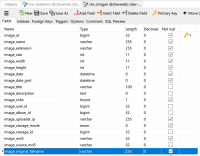
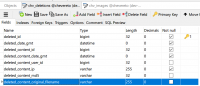
The deletions table merely copies some fields from chv_images and both fields are exactly the same:

1542673481394.png

1542673505908.png

Both highlighted fields are varchar(255) so it is impossible that deleted_content_original_filename gets populated with something larger than 255, unless of course you tweaked the chv_images table and you forgot to reflect that in the alleged table.

Also, the chv_deletions gets populated on any single image delete event. Doesn't matter if it was auto expire or whatever:

Code:
            // Log image deletion
            DB::insert('deletions', [
                'date_gmt'            => G\datetimegmt(),
                'content_id'        => $image['id'],
                'content_date_gmt'    => $image['date_gmt'],
                'content_user_id'    => $image['user']['id'],
                'content_ip'        => $image['uploader_ip'],
                'content_views'        => $image['views'],
                'content_md5'        => $image['md5'],
                'content_likes'        => $image['likes'],
                'content_original_filename'    => $image['original_filename'],
            ]);
 
Back
Top