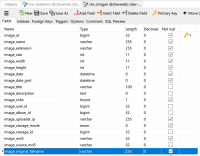
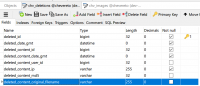
Under deletions table, column deleted_content_original_filename varchar(255) can hold only 255 character filename. When auto expire setting try to delete a image with file name that has more than 255 character it keeps throwing below error in nginx error logs. This essentially stops the auto-expire system from working and error log keeps filling with this error.
▶🚶Reproduction steps
The image will not get deleted.
📃Error log message
2018/11/14 18:28:15 [error] 61520#61520: *17485123 FastCGI sent in stderr: "PHP message: CHV\ImageException: SQLSTATE[22001]: String data, right truncated: 1406 Data too long for column 'deleted_content_original_filename' at row 1 (LINE:467) in /var/www/html/app/lib/classes/class.image.php:1428
The solution is to manually delete the file and remove the entry from the database. I think changing the data type for deleted_content_original_filenam change from varchar(255) to text as in the image table should solve this.
▶🚶Reproduction steps
- Upload an image with more than 255 character file name. (Yes, some people do that)
- Set auto expire to 5 or 10 mins.
The image will not get deleted.
📃Error log message
2018/11/14 18:28:15 [error] 61520#61520: *17485123 FastCGI sent in stderr: "PHP message: CHV\ImageException: SQLSTATE[22001]: String data, right truncated: 1406 Data too long for column 'deleted_content_original_filename' at row 1 (LINE:467) in /var/www/html/app/lib/classes/class.image.php:1428
The solution is to manually delete the file and remove the entry from the database. I think changing the data type for deleted_content_original_filenam change from varchar(255) to text as in the image table should solve this.
Last edited: