• Welcome to the Chevereto User Community!

    Here, users from all over the world come together to learn, share, and collaborate on everything related to Chevereto. It's a place to exchange ideas, ask questions, and help improve the software.

    Please keep in mind:

    • This community is user-driven. Always be polite and respectful to others.
    • Support development by purchasing a Chevereto license, which also gives you priority support.
    • Go further by joining the Community Subscription for even faster response times and to help sustain this space
  • Chevereto Support CLST

    Support response

    Support checklist

    • Got a Something went wrong message? Read this guide and provide the actual error. Do not skip this.
    • Confirm that the server meets the System Requirements
    • Check for any available Hotfix - your issue could be already reported/fixed
    • Read documentation - It will be required to Debug and understand Errors for a faster support response

Avatar upload

Version
4.4.1
PHP version
8.3.6
Database driver
MariaDB
Database version
10.11.13
Web browser
any

evil

Chevereto Member

Reproduction steps

  • Log in as a registered user
  • Go to the user profile settings
  • Try to upload a custom avatar image
  • Save changes

Unexpected result

  • The avatar upload appears to succeed (no visible error is shown to the user)
  • The avatar is never displayed after upload
  • Refreshing the page or re-logging does not show the uploaded avatar

Error log message

ErrorException in /app/src/Legacy/Classes/LocalStorage.php:114

Message [Code #2]
fileperms(): stat failed for G?P??/

Time
2026-01-08T16:40:09+00:00 [1767890409]

Incident
695fdde998e66

Backtrace
------------------------------------------------------------
0 /app/src/Legacy/Classes/LocalStorage.php:114
{main}()
------------------------------------------------------------
1 /app/src/Legacy/Classes/LocalStorage.php:114
fileperms()
------------------------------------------------------------
2 /app/src/Legacy/Classes/Storage.php:243
Chevereto\Legacy\Classes\LocalStorage->mkdirRecursive()
------------------------------------------------------------
3 /app/src/Legacy/Classes/AssetStorage.php:65
Chevereto\Legacy\Classes\Storage::uploadFiles()
------------------------------------------------------------
4 /app/src/Legacy/Classes/User.php:472
Chevereto\Legacy\Classes\AssetStorage::uploadFiles()
------------------------------------------------------------
5 /app/legacy/routes/json.php:278
Chevereto\Legacy\Classes\User::uploadPicture()
------------------------------------------------------------
6 /app/src/Legacy/G/Handler.php:456
Chevereto\Legacy\G\Handler->{closure}()
------------------------------------------------------------
7 /app/src/Legacy/G/Handler.php:180
Chevereto\Legacy\G\Handler->processRequest()
------------------------------------------------------------
8 /app/legacy/load/web.php:903
Chevereto\Legacy\G\Handler->__construct()
------------------------------------------------------------
9 /app/legacy/entrypoints/index.php:45
require_once()
------------------------------------------------------------
10 /app/index.php:12
require_once()
------------------------------------------------------------
 
Unable to reproduce. Please indicate both host system and filesystem specs.
 
I have a similar problem. After loading, the user profile background image and avatar aren't displayed. Installed version (4.4.1). I'm not sure if it worked on 4.4.0, but it definitely worked on 4.3.7.
 
I have a similar problem. After loading, the user profile background image and avatar aren't displayed. Installed version (4.4.1). I'm not sure if it worked on 4.4.0, but it definitely worked on 4.3.7.
That's a great follow up! Please indicate both host system and filesystem specs.
 
5.15.0-152-generic #162-Ubuntu
-----------
Filesystem Type 1K-blocks Used Available Use% Mounted on
tmpfs tmpfs 809156 1248 807908 1% /run
/dev/sda2 ext4 102623160 37220752 60143300 39% /
tmpfs tmpfs 4045764 0 4045764 0% /dev/shm
tmpfs tmpfs 5120 0 5120 0% /run/lock
/dev/sdb1 ext4 8321323076 626535128 7275341268 8% /home/allwebs/htdocs/allwebs.ru/images
tmpfs tmpfs 809152 4 809148 1% /run/user/1000
-----------
 

Attachments

  • 8103b4bfaaf2c7c945be343c52115a68.png
    8103b4bfaaf2c7c945be343c52115a68.png
    12.5 KB · Views: 5
  • 4055b272de44c136f9df55396a5fd767.png
    4055b272de44c136f9df55396a5fd767.png
    17.1 KB · Views: 5
Host system:
  • Ubuntu 24.04.3 LTS (Noble)
  • Kernel: Linux 6.8.0-85-generic (x86_64)

Filesystem:
- Application filesystem: ext4

Application paths & permissions:
- /www/app
- Owner: www-data
- Group: www-data
- Permissions: 755

- /www/content/images
- Owner: www-data
- Group: www-data
- Permissions: 755

Locale / encoding:
  • LANG=C.UTF-8
  • LC_ALL=
 
Additional information

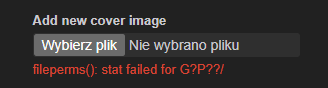
The same issue occurs when attempting to upload a home cover image.

As shown in the screenshot below, the following error is displayed:

fileperms(): stat failed for G?P??/

The upload process fails in the same way as with avatar and profile background uploads, indicating that this issue is not limited to a single feature but affects multiple image upload functionalities.

1773952283344.png
 
Additional information

The same issue occurs when attempting to upload a home cover image.

As shown in the screenshot below, the following error is displayed:


The upload process fails in the same way as with avatar and profile background uploads, indicating that this issue is not limited to a single feature but affects multiple image upload functionalities.

View attachment 6590
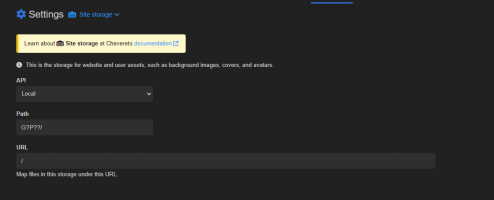
Check the path in /settings/site-storage, it got lost and that was the problem.
 
Thanks for the hint — you were right. As shown in the screenshot, the storage path was incorrectly set (invalid/missing), which explains the fileperms() error. 😉

Zrzut ekranu 2026-03-20 075016.png

Could you please let me know what the default path should be here? What was the original default value for this setting?

I’ve currently set it to content/images — is that the correct path?
Also, what should the proper permissions be for directories inside this path? Right now they are set to 755.

At the moment the error is gone, but uploads (e.g. home cover) still don’t work correctly — the record is created in the database, but the file is not physically saved on the server.


####

Ok, I found the solution.


Since my hosting is set up in a non-standard directory, setting the Path to content/images/ was incorrect — it kept creating nested content/images/ directories inside each other.


I had to use the full absolute path to the hosting root directory (e.g. /home/xxx/xxx/cheve), and that resolved the issue.


Cheers 😉
 
Last edited:
Back
Top