

3.11.0 has been just released and in this post, you will learn about the new virtual external servers.
Virtual external servers
Now you will be able to set up virtual external storage servers which store the images to any given path in your server. To use this feature simply navigate to Dashboard > Settings > External Storage and when adding/editing an external storage you will see something like this:
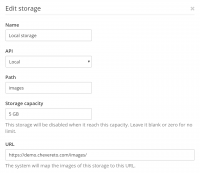
Note: Path is relative to your Chevereto root.
This new storage API is perfect for those who want the benefits of external storage (container, custom URL) but without having to actually purchase an additional storage server. Since storages in Chevereto are switchable, it will make the transition from local to true external way more easier.
I also included a tool to migrate local uploads to your target virtual external server. To access this tool navigate through Dashboard > Settings > Tools where you should see something like this:

Hope you like the new virtual external servers, feel free to share your thoughts.
Virtual external servers
Now you will be able to set up virtual external storage servers which store the images to any given path in your server. To use this feature simply navigate to Dashboard > Settings > External Storage and when adding/editing an external storage you will see something like this:
Note: Path is relative to your Chevereto root.
This new storage API is perfect for those who want the benefits of external storage (container, custom URL) but without having to actually purchase an additional storage server. Since storages in Chevereto are switchable, it will make the transition from local to true external way more easier.
I also included a tool to migrate local uploads to your target virtual external server. To access this tool navigate through Dashboard > Settings > Tools where you should see something like this:
Hope you like the new virtual external servers, feel free to share your thoughts.
