bobbysamai
Chevereto Member
When you're browsing on mobile device, I noticed that it's not very intuitive on what to click to select an image that's already on your phone. I see links for "take a picture" or "add image URLs" but you don't see "upload from your device" I know you have to click the box and arrow image, but some of my users are saying they didn't know that... any chance we can get that resolved in new updates?
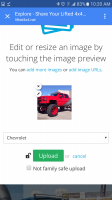
Second thing is, after you've selected a photo, the blue "upload" button requires you to scroll down to see it, many of my users are missing this, and abandoning because they didn't know they had to scroll down to find the "upload" button. Can we get that fixed in new versions?
[see attached screenshots for reference to my two topics]
Thanks Community!
Second thing is, after you've selected a photo, the blue "upload" button requires you to scroll down to see it, many of my users are missing this, and abandoning because they didn't know they had to scroll down to find the "upload" button. Can we get that fixed in new versions?
[see attached screenshots for reference to my two topics]
Thanks Community!