• Welcome to the Chevereto User Community!

    Here, users from all over the world come together to learn, share, and collaborate on everything related to Chevereto. It's a place to exchange ideas, ask questions, and help improve the software.

    Please keep in mind:

    • This community is user-driven. Always be polite and respectful to others.
    • Support development by purchasing a Chevereto license, which also gives you priority support.
    • Go further by joining the Community Subscription for even faster response times and to help sustain this space

Questions regarding Thumb images and Navigation

domaincamp

Chevereto Member
Hi, Rodolfo

Thanks for the great script. I'm so happy I found this one instead of buying others from php script aftermarket.

With your help my site is working now. I have two questions:

1. Is it possible to show thumb images on frontpage with fixed height? So the thumb images still show the full content of the photo. Just like the screenshot I took from other site.

fixedheight.jpg

2. By searching the forum, I found that you mentioned in a thread that you are going to add the "next" and "previous" navigation to the single image page (not album) to V3.8.0. I checked the admin dashboard carefully, but still didn't see how to enable this function. Could you let me know how to enable it?

Thank you again!
 
Hi there, glad to know that you like Chevereto.

1. Dashboard > Settings > Listing, select "fixed height".

2. No, I won't add "prev" and "next" to /image. I will add an explore viewer, from listing but that isn't /image.

Cheers,
Rodolfo.
 
Hi there, glad to know that you like Chevereto.

1. Dashboard > Settings > Listing, select "fixed height".

2. No, I won't add "prev" and "next" to /image. I will add an explore viewer, from listing but that isn't /image.

Cheers,
Rodolfo.

Rodolfo, thanks for the prompt response!

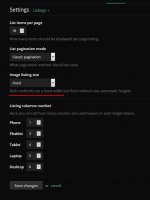
I checked the Settings > Listing carefully, but I didn't see the option to select "Fixed Height", the only place to change image listing size says "Both methods use a fixed width" and there's no way to change it to "Fixed Height"
Please check the screenshot.

Looking forward to see your new updates regarding the Explore Viewer later!

height.jpg
 
Chevereto doesn't have the listing display that you posted in the OP. It has fluid or fixed size.

So as you mentioned in #2
1. Dashboard > Settings > Listing, select "fixed height".

How to do so? or is it possible to change the code to show the full image in thumbs in explore than just showing a image with same width and height? Thanks
 
Listings can be fluid (like Pinterest) or fixed (same width x height). In fixed listings the size will be calculated depending on the number of columns and the size of the screen. For anything else the answer is no, the system doesn't have any extra listing method and anything extra you want to add is on your own.
 
Back
Top