• Welcome to the Chevereto User Community!

    Here, users from all over the world come together to learn, share, and collaborate on everything related to Chevereto. It's a place to exchange ideas, ask questions, and help improve the software.

    Please keep in mind:

    • This community is user-driven. Always be polite and respectful to others.
    • Support development by purchasing a Chevereto license, which also gives you priority support.
    • Go further by joining the Community Subscription for even faster response times and to help sustain this space
  • Chevereto Support CLST

    Support response

    Support checklist

    • Got a Something went wrong message? Read this guide and provide the actual error. Do not skip this.
    • Confirm that the server meets the System Requirements
    • Check for any available Hotfix - your issue could be already reported/fixed
    • Read documentation - It will be required to Debug and understand Errors for a faster support response

Login Button Missing

thriftgirl_62

Chevereto Member
🎯Description of the issue

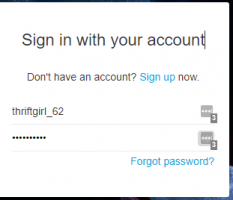
Cannot login because there is no Login button on the login page

▶🚶‍Reproduction steps

After sign-up, logout and then go to https://ez-1.net/photos/login

😢Unexpected result

Unable to Login

📃Error log message

[Provide any relevant error log entry. You may check our documentation for help on this]
 
I can see the login button in your website, is a grey button with a white arrow. It changes color on over.

Perhaps you have conflicts with your web browser.
 
I can see the login button in your website, is a grey button with a white arrow. It changes color on over.

Perhaps you have conflicts with your web browser.
You know what? I'm pretty sure you are right. Chrome has a tendency to do that at all the wrong times. My first clue: after you enter the PW, hit the Enter button then Boom, you are logged in. Thank you, Mr. "Stalk Me" Rudolfo.

Just 1 special request: Add instructions to those who use Chrome. Hit Enter if you don't see the Button - or something like that. Thank-you!
 
The grey button with the arrow shows up in Chrome. The reason I couldn't see it is because I use LastPass and it puts a box next to the username and password that covers it up. It would be nice to have a "Sign In" button at the bottom like the "Sign up" button but that's okay. I know now.
screenshot-ez-1.net.png
 
You could hack the CSS of that button, simply change the positioning. Use position static and the button will be below the box.
 
Back
Top