• Welcome to the Chevereto User Community!

    Here, users from all over the world come together to learn, share, and collaborate on everything related to Chevereto. It's a place to exchange ideas, ask questions, and help improve the software.

    Please keep in mind:

    • This community is user-driven. Always be polite and respectful to others.
    • Support development by purchasing a Chevereto license, which also gives you priority support.
    • Go further by joining the Community Subscription for even faster response times and to help sustain this space
  • Chevereto Support CLST

    Support response

    Support checklist

    • Got a Something went wrong message? Read this guide and provide the actual error. Do not skip this.
    • Confirm that the server meets the System Requirements
    • Check for any available Hotfix - your issue could be already reported/fixed
    • Read documentation - It will be required to Debug and understand Errors for a faster support response

iOS + macOS "Upload to Chevereto" shortcut

Rodolfo

👑 Chevereto Godlike
Chevereto Staff
Administrator
Hello,

Some time ago @Fumi shared a iOS shortcut for Chevereto, I've made some improvements on top of it.
  1. Support for multiple files
  2. Works by dropping files into the icon/open select files
  3. Works as quick action (right click upload to Chevereto)
  4. Filters extensions
  5. Automatic to JPEG conversion (if needed)
  6. ERROR + OK collection
To setup this download the attachment, when importing it will ask for "Chevereto URL" (enter your Chevereto URL like https://demo.chevereto.com) and for "API key" (enter the API key you get from /settings/api OR the public API).

Hope you can give it a try.
 

Attachments

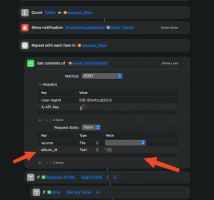
If you want, you can easily modify this to upload to a specific album.

Just add a new text item to the request body, call it album_id and put the value as the album id you want to upload to.
 

Attachments

  • SCR-20250402-jjhv.png
    SCR-20250402-jjhv.png
    288.5 KB · Views: 7
Back
Top