• Welcome to the Chevereto User Community!

    Here, users from all over the world come together to learn, share, and collaborate on everything related to Chevereto. It's a place to exchange ideas, ask questions, and help improve the software.

    Please keep in mind:

    • This community is user-driven. Always be polite and respectful to others.
    • Support development by purchasing a Chevereto license, which also gives you priority support.
    • Go further by joining the Community Subscription for even faster response times and to help sustain this space

How to remove quick image view

Picn

Chevereto Member
I want to remove quick image view black background . If you click on pages like /explore/recent, /explore/trending and other any thumbs i like immediately opens a page with embed codes. How to remove this page, which is on the screenshot and click directly to the full image page please help!

 
As far as I understand you only want to remove the background color?
This should be found in the \app\themes\Peafowl\style.css file on line 1694.
[CODE lang="css" title="\app\themes\Peafowl\style.css" highlight="2"].viewer {
background: #000;
position: fixed;
top: 0;
right: 0;
bottom: 0;
left: 0;
z-index: 500;
}[/CODE]
I have not tested it because I no longer use this image preview but the Lightbox2
 
Open files:
  • /app/themes/Peafowl/tpl_list_item/images.php
  • /app/themes/Peafowl/tpl_list_item/user/images.php
  • /app/themes/Peafowl/tpl_list_item/album/images.php
In line 3
PHP:
        <a href="%IMAGE_URL_VIEWER%" class="image-container">
So it should currently be there with you.
Just experiment a bit.
Unfortunately, I can not say more about it.
If I remove the Lightbox2 with me, I come to the desired result, which is opened with a click on an image directly the link without this full view
 
After a long search back and forth in the code, unfortunately, I have not quite found it.
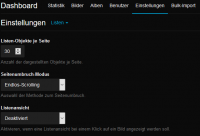
But in the Dashboard, there is this attitude that probably responsible.

Following steps:
Dashboard -> Preferences -> Lists -> List View == Disable

screenshot-2019.11.24-00-23-11.png
 
Oh yessss, Yhank you Very Much! This is what had to be done!
And here I shoveled the half of the code in the script, but It turns out everything was much easier ...
BIG LIKE!
 
I have to say that we should have a search for the admin panel. I get lost all the time and I build the thing 😱
 
Thank you! I wanted to disable it it cuts into ad revenue drastically and it makes it hard to get links !
 
Back
Top