• Welcome to the Chevereto User Community!

    Here, users from all over the world come together to learn, share, and collaborate on everything related to Chevereto. It's a place to exchange ideas, ask questions, and help improve the software.

    Please keep in mind:

    • This community is user-driven. Always be polite and respectful to others.
    • Support development by purchasing a Chevereto license, which also gives you priority support.
    • Go further by joining the Community Subscription for even faster response times and to help sustain this space

Google API Not working

Status
Not open for further replies.
https://chevereto.com/docs/social-networks

  • Go to cloud.google.com/console and click on "Create Project"
  • Set the project name and id when asked.
  • Go to your newly created project.
  • Go to APIs & Auths
    • Go to APIs and enable Google+ API.
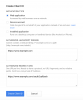
    • Go to Credentials click on "Create new client id".
    • Use the following settings:
    • Go to Consent screen and fill the form that appears at the bottom. You can add your logos and other information.
 
Are you sure?

Captura de pantalla 2015-02-23 a las 13.14.08.png

Captura de pantalla 2015-02-23 a las 13.17.35.png

The thing is exactly the same. Obviously you don't put "yourwebsite.com" you need to put your actual website URL.
 
Status
Not open for further replies.

Chevereto Cloud

Back
Top