• Welcome to the Chevereto User Community!

    Here, users from all over the world come together to learn, share, and collaborate on everything related to Chevereto. It's a place to exchange ideas, ask questions, and help improve the software.

    Please keep in mind:

    • This community is user-driven. Always be polite and respectful to others.
    • Support development by purchasing a Chevereto license, which also gives you priority support.
    • Go further by joining the Community Subscription for even faster response times and to help sustain this space
  • Chevereto Support CLST

    Support response

    Support checklist

    • Got a Something went wrong message? Read this guide and provide the actual error. Do not skip this.
    • Confirm that the server meets the System Requirements
    • Check for any available Hotfix - your issue could be already reported/fixed
    • Read documentation - It will be required to Debug and understand Errors for a faster support response

custom footer.php now working

Showfom

Chevereto Member
I followed this guide


Created a file named /content/legacy/themes/Peafowl/custom_hooks/footer.php and added some HTML code but not working

BTW, there is typo from the sample file footer.sample.php, maybe it's just copied from header.sample.php

PHP:
<?php

// @phpstan-ignore-next-line
if (!defined('ACCESS') || !ACCESS) {
    die('This file cannot be directly accessed.');
}
?>
<?php /* Code you add in this file  will be added to the header, after head. See: app/themes/Peafowl/header.php */ ?>
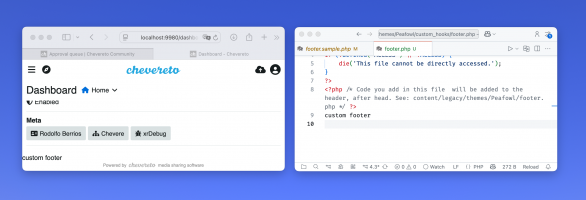
 
It works for me.

1749132136871.png

The sample you mention is just a comment, it doesn't concern the actual functionality.

Main reasons why it could be failing:
  • When using Docker, you can't directly edit files inside a container. You need to bind mount them from the host. This is by design: Docker employs a layered, immutable filesystem where changes made inside the container are ephemeral and lost upon restart. Modifying files directly within the container is considered an anti-pattern. The proper approach is to externalize configuration or content via bind mounts or volumes, ensuring persistence and alignment with Docker's principles of reproducibility and immutability.
  • In systems where OPCache preloading is activated, the file change won't be visible until you re-start PHP service (either Apache or whatever runs PHP).
  • You edited the wrong file.
Let us know if you find the cause of it.

Cheers,
Rodolfo.
 
Problem fixed by removing the <?php *** ?> code block, just paste HTML code under

Code:
<?php

// @phpstan-ignore-next-line
if (!defined('ACCESS') || !ACCESS) {
    die('This file cannot be directly accessed.');
}
?>

And it works.
 
Try using a code editor with PHP syntax support, that way it will be way easier to spot future issues.
 
Problem fixed by removing the <?php *** ?> code block, just paste HTML code under

Code:
<?php

// @phpstan-ignore-next-line
if (!defined('ACCESS') || !ACCESS) {
    die('This file cannot be directly accessed.');
}
?>

And it works.
Hello, could you share your HTML code with me? After I used override, the footer can be displayed, but other functional buttons on the page are not working. When I click the upload button, the page directly jumps to the content page. That's quite strange.
 
Back
Top