• Welcome to the Chevereto User Community!

    Here, users from all over the world come together to learn, share, and collaborate on everything related to Chevereto. It's a place to exchange ideas, ask questions, and help improve the software.

    Please keep in mind:

    • This community is user-driven. Always be polite and respectful to others.
    • Support development by purchasing a Chevereto license, which also gives you priority support.
    • Go further by joining the Community Subscription for even faster response times and to help sustain this space
  • Chevereto Support CLST

    Support response

    Support checklist

    • Got a Something went wrong message? Read this guide and provide the actual error. Do not skip this.
    • Confirm that the server meets the System Requirements
    • Check for any available Hotfix - your issue could be already reported/fixed
    • Read documentation - It will be required to Debug and understand Errors for a faster support response

An error occurred while loading Chevereto (Trying to update from 1.6.2)

Status
Not open for further replies.
Version
4.3
PHP version
8.1 or 8.3
Database driver
MariaDB
Database version
10.11.15
Web browser
Firefox 145.0.2 or Chrome 143.0.7499.40

Misterg

Chevereto Noob
I am trying to update from 1.6.2 free, following the instructions here

>Remove app/vendor from your Chevereto V3 installation

Done

>Override Chevereto V3 files with Chevereto V4 files

Done - I copied all files extracted from the chevereto-4.3.zip file (6MB) to my album folder

>Switch to PHP 8

Done (Initially I tried 8.0, got a warning and changed to 8.4, experienced the error below, then changed to 8.3, but this made no difference)

>Create app/env.php (see remark below)

I renamed app/settings.php to app/env.php

The contents seemed to be correct, but I'm not sure about db_driver:
<?php
$settings['db_host'] = 'localhost';
$settings['db_name'] = 'mistergo_cheve15';
$settings['db_user'] = 'mistergo_cheve15';
$settings['db_pass'] = 'XXXXXXXXXX';
$settings['db_table_prefix'] = 'chpt_';
$settings['db_driver'] = 'mysql';
$settings['db_pdo_attrs'] = [];
$settings['debug_level'] = 1;


I am unable to load Cevereto - I get the message "An error occurred while loading Chevereto."

The error log is:

[CHEVERETO LOAD ERROR] Error: Failed opening required '/home/mistergo/public_html/photo/app/legacy/load/../../vendor/autoload.php' (include_path='.:/opt/cpanel/ea-php81/root/usr/share/pear') /home/mistergo/public_html/photo/app/legacy/load/loader.php:23

It is looking for the file that was removed when I removed app/vendor.

I have searched this forum to try and find a solution, but was not successful.

Any help would be appreciated.

Thank you,

Andy
 
Hello Andy

one (Initially I tried 8.0, got a warning and changed to 8.4, experienced the error below, then changed to 8.3, but this made no difference)
This is the PHP version support table: https://v4-docs.chevereto.com/application/stack/php.html

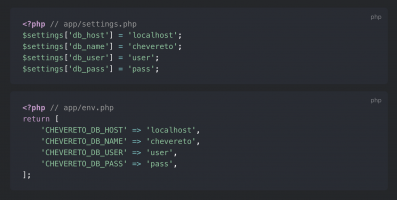
I renamed app/settings.php to app/env.php

1765411882648.png

Make sure that you update the contents accordingly app/env.php

It is looking for the file that was removed when I removed app/vendor.
You downloaded the source code, not the software package. Is not the same thing.

You need this: https://github.com/chevereto/chevereto/releases/tag/4.3.7 (about 36MB)
 
Hello again - I have come back to this.

I have been partially successful in upgrading to 4.2.5*.

I am able to connect to the database, log in and view photos. The database update reported OK.

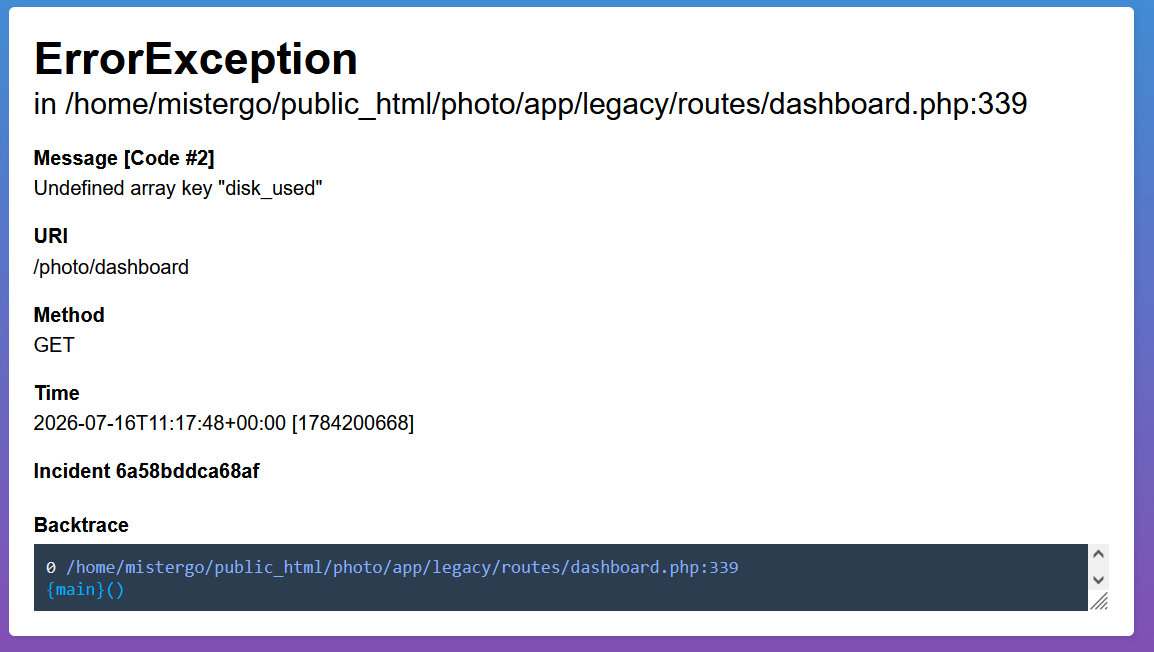
I get an error screen whenever I attempt to access the dashboard. Although I was able to reach the Settings -> System page, and could change the 'Debug errors' box to 'Enable', it reverted to 'Disabled' every time I saved the settings. I manually added debugging to the app\env.php file and get the following error message when attempting to access the dashboard:


chev2.png


***********************************
Backtrace:

0 /home/mistergo/public_html/photo/app/legacy/routes/dashboard.php:339{main}()

------------------------------------------------------------

1 /home/mistergo/public_html/photo/app/src/Legacy/G/Handler.php:455Chevereto\Legacy\G\Handler->{closure}(Chevereto\Legacy\G\Handler(#16))

------------------------------------------------------------

2 /home/mistergo/public_html/photo/app/src/Legacy/G/Handler.php:179Chevereto\Legacy\G\Handler->processRequest()

------------------------------------------------------------

3 /home/mistergo/public_html/photo/app/legacy/load/web.php:662Chevereto\Legacy\G\Handler->__construct(bool(true), Closure(#18), Closure(#15))

------------------------------------------------------------

4 /home/mistergo/public_html/photo/app/legacy/entrypoints/index.php:45require_once(string(length=56))

------------------------------------------------------------

5 /home/mistergo/public_html/photo/index.php:12require_once(string(length=65))

***********************************************

app/env.php is as follows:

<?php

return [
'CHEVERETO_DB_HOST' => 'localhost',
'CHEVERETO_DB_NAME' => 'xxxxxxxxxxxxxxxx',
'CHEVERETO_DB_PASS' => 'xxxxxxxxxx',
'CHEVERETO_DB_PORT' => '3306',
'CHEVERETO_DB_USER' => 'xxxxxxxxxxxxxxxx',
'CHEVERETO_DB_TABLE_PREFIX' => 'chpt_',
'CHEVERETO_ENCRYPTION_KEY' => 'xxxxxxxxxxxxxxxxxxxxxxxxxxxxxxxxxxxxxxxxxxxx',
'CHEVERETO_DEBUG_LEVEL' => '3'
];


I am now at a loss as to how to proceed.

Any assistance would be appreciated.

Thanks,

Andy


*I tried 4.5.5, 4.4.2 and kept getting an error as soon as I logged in.

4.3.7 allowed me to connect to the database and log in, but I was unable to update the database or access the dashboard. The error log showed repeated entries as follows:

"[16-Jul-2026 08:50:27 UTC] PHP Warning: require_once(/home/mistergo/public_html/photo/app/legacy/load/../../vendor/autoload.php): Failed to open stream: No such file or directory in /home/mistergo/public_html/photo/app/legacy/load/loader.php on line 23"

It seems autoload.php was looking for '/composer/autoload_real.php' which didn't seem to exist in the installation (no composer directory)

I therefore decided to try an even earlier version...
 
Why you are updating to 4.2.5 and not the latest release (4.5.5)?

Sorry, I tried to explain at the end of my post above:

I tried 4.5.5 and kept getting an error as soon as I tried to log in (no login screen - just an error). Same with 4.4.2.

4.3.7 allowed me to connect to the database and log in, but I was unable to update the database or access the dashboard. The error log showed repeated entries as follows:

"[16-Jul-2026 08:50:27 UTC] PHP Warning: require_once(/home/mistergo/public_html/photo/app/legacy/load/../../vendor/autoload.php): Failed to open stream: No such file or directory in /home/mistergo/public_html/photo/app/legacy/load/loader.php on line 23"

It seems autoload.php was looking for '/composer/autoload_real.php' which didn't seem to exist in the installation (no composer directory)

I therefore decided to try an even earlier version.
 
If you download the "source code" file you need to build the vendor dependencies on your own, because it is just the source code.

You need to download the "4.x.y.zip" file, because that is the distribution package.
 
If you download the "source code" file you need to build the vendor dependencies on your own, because it is just the source code.

You need to download the "4.x.y.zip" file, because that is the distribution package.
Yes, sir - that is what I have done. I deleted everything in my original installation directory except the images directory (as it contains my current images). I expanded the zip file and copied everything except the images directory to my installation directory.
 
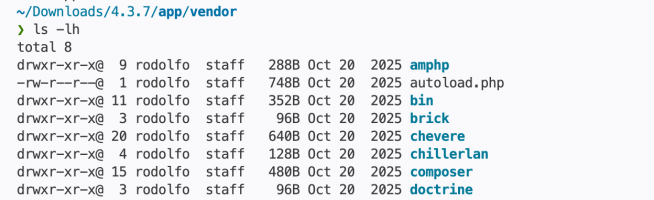
@Misterg I've just downloaded 4.3.7 from https://github.com/chevereto/chevereto/releases/download/4.3.7/4.3.7.zip

Here is the file you keep saying is not there:

1784471012557.png

Chances are you are not using a package distributed by us, in which case I refuse to provide support for.
 
Status
Not open for further replies.
Back
Top