
Reproduction steps
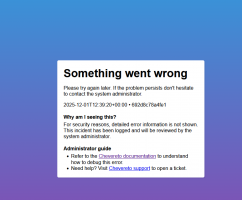
[01-Dec-2025 PHP Warning: require(/home/imgdom/imagedomain.com/app/vendor/composer/../nikic/fast-route/src/functions.php): Failed to open stream: No such file or directory in /home/imgdom/imagedomain.com/app/vendor/composer/autoload_real.php on line 42
[01-Dec-2025 [CHEVERETO LOAD ERROR] Error: Failed opening required '/home/imgdom/imagedomain.com/app/vendor/composer/../nikic/fast-route/src/functions.php' (include_path='.:/opt/alt/php83/usr/share/pear:/opt/alt/php83/usr/share/php:/usr/share/pear:/usr/share/php') /home/imgdom/imagedomain.com/app/vendor/composer/autoload_real.php:42
[01-Dec-2025 PHP Warning: require(/home/imgdom/imagedomain.com/app/vendor/composer/../xrdebug/php/src/functions.php): Failed to open stream: No such file or directory in /home/imgdom/imagedomain.com/app/vendor/composer/autoload_real.php on line 42
[01-Dec-2025 [CHEVERETO LOAD ERROR] Error: Failed opening required '/home/imgdom/imagedomain.com/app/vendor/composer/../xrdebug/php/src/functions.php' (include_path='.:/opt/alt/php83/usr/share/pear:/opt/alt/php83/usr/share/php:/usr/share/pear:/usr/share/php') /home/imgdom/imagedomain.com/app/vendor/composer/autoload_real.php:42
- Update from 4.1.4 to 4.3.7
- Refresh files tab (images) in admin panel
- No images in "files" tab
[01-Dec-2025 PHP Warning: require(/home/imgdom/imagedomain.com/app/vendor/composer/../nikic/fast-route/src/functions.php): Failed to open stream: No such file or directory in /home/imgdom/imagedomain.com/app/vendor/composer/autoload_real.php on line 42
[01-Dec-2025 [CHEVERETO LOAD ERROR] Error: Failed opening required '/home/imgdom/imagedomain.com/app/vendor/composer/../nikic/fast-route/src/functions.php' (include_path='.:/opt/alt/php83/usr/share/pear:/opt/alt/php83/usr/share/php:/usr/share/pear:/usr/share/php') /home/imgdom/imagedomain.com/app/vendor/composer/autoload_real.php:42
[01-Dec-2025 PHP Warning: require(/home/imgdom/imagedomain.com/app/vendor/composer/../xrdebug/php/src/functions.php): Failed to open stream: No such file or directory in /home/imgdom/imagedomain.com/app/vendor/composer/autoload_real.php on line 42
[01-Dec-2025 [CHEVERETO LOAD ERROR] Error: Failed opening required '/home/imgdom/imagedomain.com/app/vendor/composer/../xrdebug/php/src/functions.php' (include_path='.:/opt/alt/php83/usr/share/pear:/opt/alt/php83/usr/share/php:/usr/share/pear:/usr/share/php') /home/imgdom/imagedomain.com/app/vendor/composer/autoload_real.php:42
Attachments
Last edited:
