https://pawportal.com/pp-logo.png
I have the right CSS to make my logo larger but that causes the gray line to stay underneath it. I don't necessarily want to make the top menu any larger. I like how it looks now, minus the line.
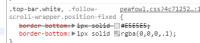
I modified STYLE.CSS and STYLE.MIN.CSS in both ../app/themes/Peafowl and ../lib/Peafowl, replacing all instances of E5E5E5 with FFFFFF. Still the line remains. If E5E5E5 is elsewhere I wasn't able to find it.
I'd just assume get rid of it, but making it FFFFFF will also work.
Thanks!
https://pawportal.com/pp-logo.png
I have the right CSS to make my logo larger but that causes the gray line to stay underneath it. I don't necessarily want to make the top menu any larger. I like how it looks now, minus the line.
I modified STYLE.CSS and STYLE.MIN.CSS in both ../app/themes/Peafowl and ../lib/Peafowl, replacing all instances of E5E5E5 with FFFFFF. Still the line remains. If E5E5E5 is elsewhere I wasn't able to find it.
I'd just assume get rid of it, but making it FFFFFF will also work.
Thanks!
https://pawportal.com/pp-logo.png