• Welcome to the Chevereto User Community!

    Here, users from all over the world come together to learn, share, and collaborate on everything related to Chevereto. It's a place to exchange ideas, ask questions, and help improve the software.

    Please keep in mind:

    • This community is user-driven. Always be polite and respectful to others.
    • Support development by purchasing a Chevereto license, which also gives you priority support.
    • Go further by joining the Community Subscription for even faster response times and to help sustain this space
  • Chevereto Support CLST

    Support response

    Support checklist

    • Got a Something went wrong message? Read this guide and provide the actual error. Do not skip this.
    • Confirm that the server meets the System Requirements
    • Check for any available Hotfix - your issue could be already reported/fixed
    • Read documentation - It will be required to Debug and understand Errors for a faster support response

Remove and Add Page Links in Toolbar, Adjust Header Size for Larger Logo

theshadowfang

Chevereto Member
I'm trying to find where i can change all the links in the tool bar ( add / remove). Also i would like to resize the header so i can have a larger logo without it being oversized.

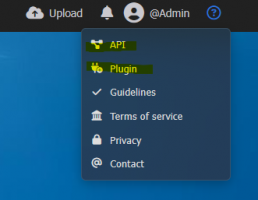
Screenshot 2025-05-05 235643.png
Screenshot 2025-05-05 235445.png
 
V4.3.0 adds a toggle to remove the API functionality (either guests/users). At Plugin settings you can control the visibility of the plugin route. For the header you need to apply CSS.
 
Back
Top