• Welcome to the Chevereto User Community!

    Here, users from all over the world come together to learn, share, and collaborate on everything related to Chevereto. It's a place to exchange ideas, ask questions, and help improve the software.

    Please keep in mind:

    • This community is user-driven. Always be polite and respectful to others.
    • Support development by purchasing a Chevereto license, which also gives you priority support.
    • Go further by joining the Community Subscription for even faster response times and to help sustain this space
  • Chevereto Support CLST

    Support response

    Support checklist

    • Got a Something went wrong message? Read this guide and provide the actual error. Do not skip this.
    • Confirm that the server meets the System Requirements
    • Check for any available Hotfix - your issue could be already reported/fixed
    • Read documentation - It will be required to Debug and understand Errors for a faster support response

ReCaptcha Error - Now no user or admin can log in

Status
Not open for further replies.

minilarge

Chevereto Noob
🎯Description of the issue

Got some emails from users about Recaptcha. Checking in on my website I noticed that the recaptcha form is not working as should. It has an error that is displayed. Once I enter test credentials it does not allow me to log in. I have not changed anything, I have not edited anything, no idea why it is showing this now for recaptcha. **I'm afraid to log-out of my account and it doesn't let me log back in...

▶🚶‍Reproduction steps
  1. Go to www.pastepic.xyz/login
  2. Create an account and try to log-in (You can see the error before you do this)
😢Unexpected result

Does not allow you to login. It provides an error.

📃Error messages

Before Logging In:
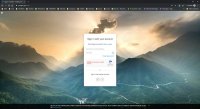
ERROR for site owner: Invalid site key
When Trying to Login:
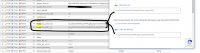
reCAPTCHA says you are a robot
recaptcha-error.jpg
 
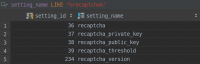
The recaptcha key that you are using is invalid. Go to the database, table chv_settings and fix the wrong data.

1569525919735.png
 
Tested recaptcha V2 on demo (my keys) and works perfectly fine. Are you sure that are using the right version?
 
Yes, but I'll put this on pause for a moment because I've also noticed that on my website you can not upload images anymore. It's giving me an error, internal server error. I believe the recaptcha is probably somehow related to this issue because I've double checked all versions, I've tried ver2, ver3, etc, updated codes, nothing worked. In the end I disabled recaptcha. I've been talking to my host for the last 2 hours trying to figure this issue out. We still have not figured it out. Website wont' let me upload any photo. Also, my other website same thing. BUT I think in a different issue I asked for support and maybe put in a code wrong (I misunderstood you)... maybe that broke it. I'm looking back on that post now to figure it out. I'm actually currently in the middle of all of this.

Thanks for your response pal.
 
Unfortunately, this ticket has more than seven days without a reply or feedback from the original poster. We will now consider this ticket abandoned and its now closed.

Don't hesitate to create a new ticket if this matter is still causing you issues.

Ticket closed.
 
Status
Not open for further replies.
Back
Top