• Welcome to the Chevereto User Community!

    Here, users from all over the world come together to learn, share, and collaborate on everything related to Chevereto. It's a place to exchange ideas, ask questions, and help improve the software.

    Please keep in mind:

    • This community is user-driven. Always be polite and respectful to others.
    • Support development by purchasing a Chevereto license, which also gives you priority support.
    • Go further by joining the Community Subscription for even faster response times and to help sustain this space
  • Chevereto Support CLST

    Support response

    Support checklist

    • Got a Something went wrong message? Read this guide and provide the actual error. Do not skip this.
    • Confirm that the server meets the System Requirements
    • Check for any available Hotfix - your issue could be already reported/fixed
    • Read documentation - It will be required to Debug and understand Errors for a faster support response

Problem saving license key to enable PRO

Version
4.4.1
PHP version
8.3
Database driver
MySQL
Database version
11.4.8-MariaDB-cll-lve-log
Web browser
Chrome,Mozilla

friv

Chevereto Member
Hello folks

I am facing with a problem when i want to paste license key in admin panel to enable pro features.
When i paste code and press "Save changes" button nothing happen.

Did somebody have a same issue?
 
Hello, thanks for reporting.

I'm inspecting why this is happening, in the meantime you can manually bind the license:

1. Create app/CHEVERETO_LICENSE_KEY.php with the following contents:

PHP:
return 'xyz_abcd1234xyzz.......';

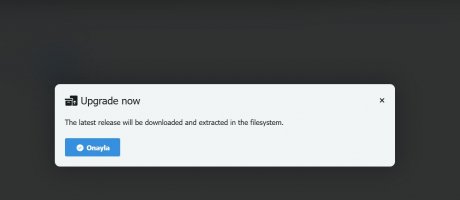
2. Go to /dashboard and click the "Upgrade now" button.
 
Hello, thanks for reporting.

I'm inspecting why this is happening, in the meantime you can manually bind the license:

1. Create app/CHEVERETO_LICENSE_KEY.php with the following contents:

PHP:
return 'xyz_abcd1234xyzz.......';

2. Go to /dashboard and click the "Upgrade now" button.
Hello rodolfo, I have same issue, and I have already tried multiple times the way you explain, but still no luck
 
I can confirm that when going from "Lite" to "Pro" there's no "Upgrade now" button (hidden). I will fix that button display on the next patch.

For now, try visiting /dashboard?upgrade as that URL triggers the process of re-downloading the app filesystem with the updated (current) license.

If that doesn't work, then the most sane course of action is to re-install the app filesystem as described here: https://v4-docs.chevereto.com/guides/cpanel/app-files.html
 
Sir, it’s not working. Reinstalling everything would be a major issue for me because it will erase all my current setup and force me to start from scratch. I have followed your documentation step by step and did everything as instructed. Is there any other solution we can try before reinstalling?
 

Attachments

  • Screenshot_1.jpg
    Screenshot_1.jpg
    28 KB · Views: 3
Back
Top