

David Field
Chevereto Member
👉Fill out this template accordingly with the issue you are experiencing. Add relevant files if needed. 🚧🚦Don't @mention to grab attention. Don't edit the titles of this template. Remove this paragraph when done.
🎯Description of the issue
I don't see the same thing from an internal IP and an external url (through nginx reverse proxy
▶🚶Reproduction steps
I have installed the chevereto software using the installer.php script on an ubuntu 2004 server running NGINX and PHP and when i access the server from the internal ip https://192.168.86.20 life is good.
I uploaded two photos as a test and I can see this as my setup homepage (persnal rather than community option)
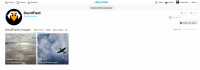
When I access the same server externally from https://www.photowalktheworld.com I see this
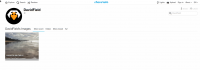
I only ever see the last photo I uploaded
Something else worth noting as well when i click on the image internally i see the full res image, when i do the same thing from the external address I just see the image expanded (so fuzzy, stretched and blocky)
My NGINX rev proxy config looks like this
[CODE title="photowaltheworld.conf"]server {
large_client_header_buffers 4 16k;
server_name www.photowalktheworld.com;
# The internal IP of the VM that hosts your Apache config
set $upstream 192.168.86.20;
location / {
proxy_pass_header Authorization;
proxy_pass https://$upstream;
proxy_set_header Host $host;
proxy_set_header X-Real-IP $remote_addr;
proxy_set_header X-Forwarded-For $proxy_add_x_forwarded_for;
proxy_http_version 1.1;
proxy_set_header Connection “”;
proxy_buffering off;
client_max_body_size 0;
proxy_read_timeout 36000s;
#proxy_redirect off;
#real_ip_header X-Forwarded-For;
#real_ip_header X-Real-IP;
}
location /app/lib/ {
proxy_pass https://$upstream/app/lib/;
}
listen 443 ssl; # managed by Certbot
ssl_certificate /etc/letsencrypt/live/www.photowalktheworld.com/fullchain.pem; # managed by Certbot
ssl_certificate_key /etc/letsencrypt/live/www.photowalktheworld.com/privkey.pem; # managed by Certbot
include /etc/letsencrypt/options-ssl-nginx.conf; # managed by Certbot
ssl_dhparam /etc/letsencrypt/ssl-dhparams.pem; # managed by Certbot
}
server {
if ($host = www.photowalktheworld.com) {
return 301 https://$host$request_uri;
} # managed by Certbot
server_name www.photowalktheworld.com;
listen 80;
return 404; # managed by Certbot
}[/CODE]
😢Unexpected result
I'd expect to see the same page logged in, logged out, with the images i've uploaded internally or externally
📃Error log message
from /var/log/nginx/error.log on the server hosting cheverto
🎯Description of the issue
I don't see the same thing from an internal IP and an external url (through nginx reverse proxy
▶🚶Reproduction steps
I have installed the chevereto software using the installer.php script on an ubuntu 2004 server running NGINX and PHP and when i access the server from the internal ip https://192.168.86.20 life is good.
I uploaded two photos as a test and I can see this as my setup homepage (persnal rather than community option)
When I access the same server externally from https://www.photowalktheworld.com I see this
I only ever see the last photo I uploaded
Something else worth noting as well when i click on the image internally i see the full res image, when i do the same thing from the external address I just see the image expanded (so fuzzy, stretched and blocky)
My NGINX rev proxy config looks like this
[CODE title="photowaltheworld.conf"]server {
large_client_header_buffers 4 16k;
server_name www.photowalktheworld.com;
# The internal IP of the VM that hosts your Apache config
set $upstream 192.168.86.20;
location / {
proxy_pass_header Authorization;
proxy_pass https://$upstream;
proxy_set_header Host $host;
proxy_set_header X-Real-IP $remote_addr;
proxy_set_header X-Forwarded-For $proxy_add_x_forwarded_for;
proxy_http_version 1.1;
proxy_set_header Connection “”;
proxy_buffering off;
client_max_body_size 0;
proxy_read_timeout 36000s;
#proxy_redirect off;
#real_ip_header X-Forwarded-For;
#real_ip_header X-Real-IP;
}
location /app/lib/ {
proxy_pass https://$upstream/app/lib/;
}
listen 443 ssl; # managed by Certbot
ssl_certificate /etc/letsencrypt/live/www.photowalktheworld.com/fullchain.pem; # managed by Certbot
ssl_certificate_key /etc/letsencrypt/live/www.photowalktheworld.com/privkey.pem; # managed by Certbot
include /etc/letsencrypt/options-ssl-nginx.conf; # managed by Certbot
ssl_dhparam /etc/letsencrypt/ssl-dhparams.pem; # managed by Certbot
}
server {
if ($host = www.photowalktheworld.com) {
return 301 https://$host$request_uri;
} # managed by Certbot
server_name www.photowalktheworld.com;
listen 80;
return 404; # managed by Certbot
}[/CODE]
😢Unexpected result
I'd expect to see the same page logged in, logged out, with the images i've uploaded internally or externally
📃Error log message
from /var/log/nginx/error.log on the server hosting cheverto
Code:
2020/08/14 16:56:31 [error] 343215#343215: *485 directory index of "/var/www/html/app/lib/" is forbidden, client: 192.168.86.49, server: _, request: "GET /app/lib/ HTTP/1.0", host: "192.168.86.20", referrer: "https://www.photowalktheworld.com/"
2020/08/14 16:56:34 [error] 343215#343215: *488 directory index of "/var/www/html/app/lib/" is forbidden, client: 192.168.86.49, server: _, request: "GET /app/lib/ HTTP/1.0", host: "192.168.86.20", referrer: "https://www.photowalktheworld.com/login"
2020/08/14 16:56:37 [error] 343215#343215: *491 directory index of "/var/www/html/app/lib/" is forbidden, client: 192.168.86.49, server: _, request: "GET /app/lib/ HTTP/1.0", host: "192.168.86.20", referrer: "https://www.photowalktheworld.com/plugin"
2020/08/14 16:57:08 [error] 343215#343215: *498 directory index of "/var/www/html/app/lib/" is forbidden, client: 192.168.86.49, server: _, request: "GET /app/lib/ HTTP/1.0", host: "192.168.86.20", referrer: "https://www.photowalktheworld.com/"
2020/08/14 16:57:11 [error] 343215#343215: *503 directory index of "/var/www/html/app/lib/" is forbidden, client: 192.168.86.49, server: _, request: "GET /app/lib/ HTTP/1.0", host: "192.168.86.20", referrer: "https://www.photowalktheworld.com/image/20200726-081705-01.KmF"
2020/08/14 16:58:54 [error] 343214#343214: *513 directory index of "/var/www/html/app/lib/" is forbidden, client: 192.168.86.49, server: _, request: "GET /app/lib/ HTTP/1.0", host: "192.168.86.20", referrer: "https://www.photowalktheworld.com/image/20200726-081705-01.KmF"
2020/08/14 16:59:08 [error] 343214#343214: *520 directory index of "/var/www/html/app/lib/" is forbidden, client: 192.168.86.49, server: _, request: "GET /app/lib/ HTTP/1.0", host: "192.168.86.20", referrer: "https://www.photowalktheworld.com/image/20200726-081705-01.KmF"
2020/08/14 17:14:38 [error] 343215#343215: *534 directory index of "/var/www/html/app/lib/" is forbidden, client: 192.168.86.49, server: _, request: "GET /app/lib/ HTTP/1.0", host: "192.168.86.20", referrer: "https://www.photowalktheworld.com/"
2020/08/14 17:14:54 [error] 343215#343215: *538 directory index of "/var/www/html/app/lib/" is forbidden, client: 192.168.86.49, server: _, request: "GET /app/lib/ HTTP/1.0", host: "192.168.86.20", referrer: "https://www.photowalktheworld.com/"
2020/08/14 17:14:54 [error] 343215#343215: *540 directory index of "/var/www/html/app/lib/" is forbidden, client: 192.168.86.49, server: _, request: "GET /app/lib/ HTTP/1.0", host: "192.168.86.20", referrer: "https://www.photowalktheworld.com/"