• Welcome to the Chevereto User Community!

    Here, users from all over the world come together to learn, share, and collaborate on everything related to Chevereto. It's a place to exchange ideas, ask questions, and help improve the software.

    Please keep in mind:

    • This community is user-driven. Always be polite and respectful to others.
    • Support development by purchasing a Chevereto license, which also gives you priority support.
    • Go further by joining the Community Subscription for even faster response times and to help sustain this space
  • Chevereto Support CLST

    Support response

    Support checklist

    • Got a Something went wrong message? Read this guide and provide the actual error. Do not skip this.
    • Confirm that the server meets the System Requirements
    • Check for any available Hotfix - your issue could be already reported/fixed
    • Read documentation - It will be required to Debug and understand Errors for a faster support response

issue with margins

Faust

Chevereto Noob
Pro
I am trying to fix the margins of the files from the right hand side. Any idea where I got wrong here?\
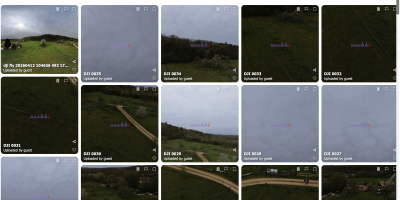
Code:
.content-listing {
    overflow: hidden; /* prevents float overflow issues */
}

.content-listing .list-item {
    float: left;
    width: calc(20% - 16px); /* 5 columns */
    margin: 10px;
    border-radius: 12px;
    overflow: hidden;
    background: #111;
    box-sizing: border-box;
    transition: transform 0.2s ease, box-shadow 0.2s ease;
}


.content-listing .list-item:nth-child(5n) {
    margin-right: 0;
}


@media (hover: hover) and (pointer: fine) {
    .content-listing .list-item:hover {
        transform: translateY(-4px);
        box-shadow: 0 10px 25px rgba(0,0,0,0.2);
    }
}


CleanShot 2026-04-19 at 15.19.37@2x.png
 
On listings, to get the masonry effect it needs JS to compute the combined size of the display columns. It detects the size on the box layout, so it accounts margins, borders and padding.

Try using a thick border instead of margin.
 
Back
Top