• Welcome to the Chevereto User Community!

    Here, users from all over the world come together to learn, share, and collaborate on everything related to Chevereto. It's a place to exchange ideas, ask questions, and help improve the software.

    Please keep in mind:

    • This community is user-driven. Always be polite and respectful to others.
    • Support development by purchasing a Chevereto license, which also gives you priority support.
    • Go further by joining the Community Subscription for even faster response times and to help sustain this space

Image View Dismiss Button

nick2

Chevereto Member
When viewing the large version of an image, I would like to suggest a dismiss button appear in similar method as the Select-Flag-Edit-Delete icons appear on the gallery view images. The dismiss button would close the large image view and return to gallery view. First let me admit to being a new user, so pardon me if my idea is incorrect or reveals my lack of understanding. However, I have found the only ways to dismiss/close the large image view are to use the back button or go to My Profile. I have attached a sketch to show this idea. Of course the x-box in the sketch is only a suggestion. The dismiss/close icon could be improved if it keeps with other navigation buttons used on the Chevereto software. Thank you very much for considering this. Also many thanks to Rodolfo and everyone who has helped develop this software. I'm enjoying it very much and it is helping me serve my business.
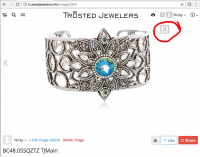
 

Attachments

  • CheveretoIdea_20161031.png
    CheveretoIdea_20161031.png
    308.5 KB · Views: 10
That's not a 'large view' but an information page. There would no where for you to go if you input an X. That page has the meta data, imbed codes, generic information, and even comments hosted on it. It's not like an expanded view but the actual technical information page. It's not a shadow box.

Problem with adding an X is that you're not creating an overlay window... It's an actual page. Click your attached file for example. That's an overlay shadowbox. However that page on your site is not.
 
Direct image links (/image/<ID>) are separed from listings because in Chevereto listing are dynamic. I will add a js image viewer (doesn't refresh the webpage to see an image) and that stuff could work with this behavior.
 
Thank you for considering my idea. I am only a user, not a developer or code writer, so I'm not familiar with overlay or how to apply the idea to the underlying code. I operate an online store and had to set up my own photo hosting site because I was not satisfied with any of the 'mainstream' sites like SmugMug, Photobucket, Flikr etc. I found Chevereto on a google search and responded to the offer combined with TMD hosting to 'set up photo hosting website in minutes'. I am enjoying using the Chevereto software very much.
 
Back
Top