
-
Welcome to the Chevereto User Community!
Here, users from all over the world come together to learn, share, and collaborate on everything related to Chevereto. It's a place to exchange ideas, ask questions, and help improve the software.
Please keep in mind:
- This community is user-driven. Always be polite and respectful to others.
- Support development by purchasing a Chevereto license, which also gives you priority support.
- Go further by joining the Community Subscription for even faster response times and to help sustain this space
-
Chevereto Support CLST
Support response
- Extra Support is delivered within 24-hours.
- Pro Subscription ticket response time is within 7 days on Software Support, Bug Tracking and RFC.
- Bug Tracking requires an active Chevereto self-hosted subscription.
- Community Help is user driven. Be polite with other users and do not expect official support.
Support checklist
- Got a Something went wrong message? Read this guide and provide the actual error. Do not skip this.
- Confirm that the server meets the System Requirements
- Check for any available Hotfix - your issue could be already reported/fixed
- Read documentation - It will be required to Debug and understand Errors for a faster support response
You are using an out of date browser. It may not display this or other websites correctly.
You should upgrade or use an alternative browser.
You should upgrade or use an alternative browser.
Guest menu bar
- Thread starter seanbrai
- Start date



seanbrai
Chevereto Member
I have discovered how to add a new link to the navbar. However as a result of the link this has occured on my site. How do I get ride of it? I added
<?php { ?>
<li class="top-btn-el">
<a href="https://www.bdsmregistry.org/registration"><span class="top-btn-text"><span class="icon icon-file"></span><span class="btn-text phone-hide phablet-hide"><?php _se('Registration'); ?></span></span></a>
</li>
<?php } ?>
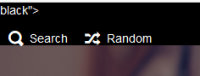
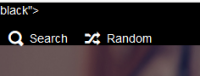
to the header.php in my theme and now I can't get this to go away. (black">)
Sean
<?php { ?>
<li class="top-btn-el">
<a href="https://www.bdsmregistry.org/registration"><span class="top-btn-text"><span class="icon icon-file"></span><span class="btn-text phone-hide phablet-hide"><?php _se('Registration'); ?></span></span></a>
</li>
<?php } ?>
to the header.php in my theme and now I can't get this to go away. (black">)
Sean

DeCysos
Phoenix Foto Service
To answer your original question
Via the following code at line: ~ 176
Above the insert
You have to change the content itself.
Why is now with you
So this must be a value added by you.
Via the following code at line: ~ 176
PHP:
<?php if (is_upload_enabled()) {
PHP:
            <li class="top-btn-el phone-hide">
                <a class="top-btn-text"><span class="icon icon-cloud-upload"></span><span class="btn-text phone-hide phablet-hide">LINKNAME</span></a>
</li>Why is now with you
black"> I can not tell you, this value does not exist in the file mentioned by you.So this must be a value added by you.
seanbrai
Chevereto Member
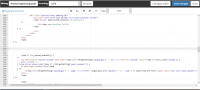
That's the weird part, is that its not. It just appeared after I modified the header.php with the above code. I have even tried to search the entire for for black"> and nothing comes up. I am open to any possible suggestion, because the even more aggravating part is that I have restored the file back to its original and that black"> still won't go away. The only thing is to install the software on another domain and copy the file off a fresh install, because undoing all the changes isn't working.
DeCysos
Phoenix Foto Service
[CODE lang="php" highlight="19-21"] <?php if (get_system_notices()) {
?>
<li data-nav="notices" class="phone-hide pop-btn pop-keep-click">
<span class="top-btn-text"><span class="icon icon-notification color-red"></span><span class="btn-text phone-hide phablet-hide"><?php _se('Notices (%s)', count(get_system_notices())); ?></span></span>
<div class="pop-box anchor-center c8 arrow-box arrow-box-top anchor-center">
<div class="pop-box-inner padding-20">
<ul class="list-style-type-decimal list-style-position-inside">
<?php foreach (get_system_notices() as $notice) {
?>
<li><?php echo $notice; ?></li>
<?php
} ?>
</ul>
</div>
</div>
</li>
<?php
} ?>
<li class="top-btn-el phone-hide">
<a class="top-btn-text" href="#"><span class="icon icon-spinner3"></span><span class="btn-text phone-hide phablet-hide">LINKNAME</span></a>
</li>
<?php if (is_upload_enabled()) {
?>
<li data-action="top-bar-upload" data-link="<?php echo CHV\getSetting('upload_gui') != 'js'; ?>" data-nav="upload" class="<?php if (G\is_route('upload')) {
echo 'current ';
} ?>top-btn-el phone-hide"<?php if (!CHV\getSetting('guest_uploads')) {
?> data-login-needed="true"<?php
} ?>>
<<?php echo CHV\getSetting('upload_gui') == 'page' ? ('a href="'.G\get_base_url('upload').'"') : 'span'; ?> class="top-btn-text"><span class="icon icon-cloud-upload"></span><span class="btn-text phone-hide phablet-hide"><?php _se('Upload'); ?></span></<?php echo CHV\getSetting('upload_gui') == 'js' ? 'span' : 'a'; ?>>
</li>
<?php
} ?>[/CODE]
So I've tried it myself at one of my instances.
It works wonderfully at the designated location.
You may have to flush your cache or another file of the themes that has been messed up is responsible.
Sorry I can not help you with this.
Maybe it's up to your editor, which looks like it's an online variant.
I myself always used the Notepad ++ with an FTP, SFTP or SCP connection to the server.
and really always make sure that the document is formatted as UTF-8.
?>
<li data-nav="notices" class="phone-hide pop-btn pop-keep-click">
<span class="top-btn-text"><span class="icon icon-notification color-red"></span><span class="btn-text phone-hide phablet-hide"><?php _se('Notices (%s)', count(get_system_notices())); ?></span></span>
<div class="pop-box anchor-center c8 arrow-box arrow-box-top anchor-center">
<div class="pop-box-inner padding-20">
<ul class="list-style-type-decimal list-style-position-inside">
<?php foreach (get_system_notices() as $notice) {
?>
<li><?php echo $notice; ?></li>
<?php
} ?>
</ul>
</div>
</div>
</li>
<?php
} ?>
<li class="top-btn-el phone-hide">
<a class="top-btn-text" href="#"><span class="icon icon-spinner3"></span><span class="btn-text phone-hide phablet-hide">LINKNAME</span></a>
</li>
<?php if (is_upload_enabled()) {
?>
<li data-action="top-bar-upload" data-link="<?php echo CHV\getSetting('upload_gui') != 'js'; ?>" data-nav="upload" class="<?php if (G\is_route('upload')) {
echo 'current ';
} ?>top-btn-el phone-hide"<?php if (!CHV\getSetting('guest_uploads')) {
?> data-login-needed="true"<?php
} ?>>
<<?php echo CHV\getSetting('upload_gui') == 'page' ? ('a href="'.G\get_base_url('upload').'"') : 'span'; ?> class="top-btn-text"><span class="icon icon-cloud-upload"></span><span class="btn-text phone-hide phablet-hide"><?php _se('Upload'); ?></span></<?php echo CHV\getSetting('upload_gui') == 'js' ? 'span' : 'a'; ?>>
</li>
<?php
} ?>[/CODE]
So I've tried it myself at one of my instances.
It works wonderfully at the designated location.
You may have to flush your cache or another file of the themes that has been messed up is responsible.
Sorry I can not help you with this.
Maybe it's up to your editor, which looks like it's an online variant.
I myself always used the Notepad ++ with an FTP, SFTP or SCP connection to the server.
and really always make sure that the document is formatted as UTF-8.
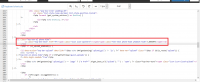


You won't ever find a needle if you don't know where to look for, specially if you don't start backwards.
1. You got a

2. As you may notice, there's a meta tag inside the header class attribute. So you should check your editing near:
3. This is how the demo prints that section:

Hope you can identify the issue.
1. You got a
black"> which is printed here in the HTML:2. As you may notice, there's a meta tag inside the header class attribute. So you should check your editing near:
Code:
<header id="top-bar" class="top-bar3. This is how the demo prints that section:
Hope you can identify the issue.