
🖼️ ResimYolu Upload Eklentisi — Tam Dokumantasyon
TÜRKÇE
📌 Sistem Nedir?
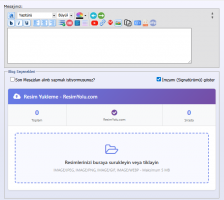
ResimYolu Upload Eklentisi , vBulletin forum yazılımı için geliştirilmiş bir resim eklentisidir . Forum kullanıcılarının, konu açarken veya cevap yazarken bilgisayarlarındaki resimleri doğrudan resimyolu.com servislerini yükleme ve yüklenen resmin BB okunması ([IMG]...[/IMG]) otomatik olarak editöre eklemelerini sağlar.👤 Kim Tarafından Yapıldı?
Eklenti aSpeNDos kullanıcı adıyla geliştirilmiş olup Netguc (netguc.com) tarafından dağıtılmaktadır. Sürüm tarihi Aralık 2025'e aittir.✨ Özellikler
- 📂 Yükleme Sürükle-bırak (sürükle & bırak) ile resim
- 🗂️ Çoklu dosya yükleme desteği
- 📊 Yükleme ilerleme çubuğu (ilerleme çubuğu)
- 🔗 Yüklenen resmin BB kodu editörüne otomatik ekleme
- 📈 Kayıt istatistikleri (toplam, beklemede)
- 🎨Modern, responsive tasarım tasarımı
- ⚙️ AdminCP üzerinden tam olarak
- 📍 Yeni konu, gelişmiş cevap ve hızlı cevap alanlarında gösterim seçeneği
📁 Dosya Yapısı
clientscript/ → JavaScript dosyaları (jQuery vb.)├── public_html/ → Web sunucusu ana dizini
│ └── upload.php → Resim yükleme backend scripti
├── xml/
│ └── resimyolu.xml → vBulletin eklenti kurulum dosyası
└── caps-resimyolu → Eklenti paketi
⚙️ Kurulum Adımları
1. Dosyaları Sunucuya Yükleyin
upload.phpforumun kök dizinine (public_html/) yükleyin.upload/bilgisayarını birleştirme ve yazma izni (777) verin:public_html/└── upload/└── temp/ ← Otomatik oluşturulur
2. XML eklentisini Kurun
- vBulletin AdminCP'ye giriş yapın.
- Eklentiler ve Ürünler → Ürünleri Yönet → Ürün Ekle/İçe Aktar yolunu izleyin.
resimyolu.xmlYüklemeyi yapın ve kurulumu tamamlayın.
3. API Anahtarını Ayarlayın
upload.phpöğelerinin açılması ve şu bölümlerin bölümleri:API'nizi resimyolu.com üzerinden edinebilirsiniz.
4. AdminCP Ayarlarını Yapılandırın
- AdminCP → Ayarlar → Seçenekler → Cyb - Resim Yolu - Ayarlar bölümüne gidin.
| Ayar | Açıklama |
|---|---|
| Eklentiyi Aktif Et | eklentiyi galeriler/kapatır |
| API Anahtarı | resimyolu.com API anahtarı |
| API URL | Yükleme uç noktası adresi |
| Maksimum Dosya Boyutu | MB cinsi limiti (varsayılan: 5MB) |
| Görsel Dosya Tipleri | image/jpeg,image/png,image/gif,image/webp |
| Hızlı Cevapta Göster | Hızlı Yanıt'da göster/gizle |
| Doğal Cevapta Göster | Gelişmiş Yanıt'da göster/gizle |
| Yeni Konuda Göster | Yeni Konu'da göster/gizle |
5. Şablon Ayarları
AdminCP → Stiller ve Şablonlar → Stil Yöneticisi → Şablonları Düzenle bölümünde:- NEWTHREAD şablonu →
<textarea name="message"bölümünün ÜSTÜNE'sini ekleyin:
$resimyolu_upload_form- NEWREPLY şablonu → Aynı şekilde textarea'nın tamamını ekleyin.
- SHOWTHREAD şablonu → Düzenleyici div'inin tamamını ekleyin.
🔄 Nasıl Çalışır?
- Kullanıcı forumda konu açar veya cevap yazar.
- Yükleme panelinden resim seçer veya sürükleyip bırakır.
upload.phpverileri resmi olarak alır, geçici klasörüne kaydeder.- PHP cURL ile resmi resimyolu.com API'sine gönderilir.
- API başarılı yanıtları verince resmi URL'si düzeni
[IMG]URL[/IMG]editörü temeli. - Yükleme günlüğü veri tabanına depolanır (
resimyolu_logtablo).
🗄️ Veritabanı Tabloları
resimyolu_log— Saklama kaydı:userid,filename,filesize,uploadtime,imageurl,thumburl,status,errorcoderesimyolu_stats— Genel istatistikler:totaluploads,totalsize,totalerrors,lastupdated
🗑️ (Kaldır)
Yönetici Paneli → Eklentiler ve Ürünler → Ürünleri Yönet → ResimYolu → KaldırBu işlem otomatik olarak yapılır:
resimyolu_logtablonu silerresimyolu_statstablonu siler- Tüm eklenti ve şablon kayıtlarını temizler
⚠️ Önemli Notlar
upload/bilgisayarın yazma iznine sahip olması zorunludur.upload.phpİçerdeki API anahtarı mutlaka gerçek anahtarla değiştirilmelidir.- SSL verisi devre dışı bırakılmıştır (
CURLOPT_SSL_VERIFYPEER => false); Üretim ortamında etkinleştirilmesi tavsiye edilir. - Hatalar için
upload/debug.logolanları inceleyebilirsiniz.
ENGLISH
📌 What Is This System?
The ResimYolu Upload Plugin is an image uploading add-on developed for the vBulletin forum software. It allows forum users to upload images from their computers directly to the resimyolu.com hosting service while creating threads or writing replies, and automatically inserts the resulting BB code ([IMG]...[/IMG]) into the editor.👤 Who Made It?
The plugin was developed under the username aSpeNDos and is distributed by Netguc (netguc.com). The version date is December 2025.✨ Features
- 📂 Drag & drop image uploading
- 🗂️ Multiple file upload support
- 📊 Upload progress bar
- 🔗 Auto-inserts BB code into the editor
- 📈 Upload statistics (total, in queue)
- 🎨 Modern, responsive UI design
- ⚙️ Full configuration via AdminCP
- 📍 Display options for new thread, advanced reply, and quick reply areas
📁 File Structure
/├── clientscript/ → JavaScript files (jQuery etc.)
├── public_html/ → Web server root directory
│ └── upload.php → Image upload backend script
├── xml/
│ └── resimyolu.xml → vBulletin plugin installation file
└── caps-resimyolu → Plugin package
⚙️ Installation Steps
1. Upload Files to Server
- Upload
upload.phpto the forum root directory (public_html/). - Create the
upload/folder and set write permissions (777):
└── upload/
└── temp/ ← Created automatically
2. Install the XML Plugin
- Log into vBulletin AdminCP.
- Navigate to Plugins & Products → Manage Products → Add/Import Product.
- Upload
resimyolu.xmland complete the installation.
3. Set Your API Key
Openupload.php and edit the following lines:You can obtain your API key from resimyolu.com.
4. Configure AdminCP Settings
- Go to AdminCP → Settings → Options → Cyb - Resim Yolu - Ayarlar
| Setting | Description |
|---|---|
| Enable Plugin | Turns the plugin on/off |
| API Key | Your resimyolu.com API key |
| API URL | Upload endpoint address |
| Max File Size | Limit in MB (default: 5MB) |
| Allowed File Types | image/jpeg,image/png,image/gif,image/webp |
| Show in Quick Reply | Show/hide in Quick Reply area |
| Show in Advanced Reply | Show/hide in Advanced Reply area |
| Show in New Thread | Show/hide in New Thread page |
5. Template Edits
Go to AdminCP → Styles & Templates → Style Manager → Edit Templates:- NEWTHREAD template → Add ABOVE the
<textarea name="message"line:
$resimyolu_upload_form- NEWREPLY template → Same, above the textarea.
- SHOWTHREAD template → Add above the editor div.
🔄 How It Works
- User opens a new thread or writes a reply on the forum.
- User selects or drags & drops an image into the upload panel.
upload.phpreceives the file and saves it to a temporary folder.- PHP cURL sends the image to the resimyolu.com API.
- On a successful API response, the image URL is inserted into the editor as
[IMG]URL[/IMG]. - The upload is logged in the database (
resimyolu_logtable).
🗄️ Database Tables
resimyolu_log — Record of each upload:userid,filename,filesize,uploadtime,imageurl,thumburl,status,errorcode
resimyolu_stats — General statistics:totaluploads,totalsize,totalerrors,lastupdated
🗑️ Uninstallation
AdminCP → Plugins & Products → Manage Products → ResimYolu → UninstallThis will automatically:
- Drop the
resimyolu_logtable - Drop the
resimyolu_statstable - Remove all plugin hooks and templates
⚠️ Important Notes
- The
upload/folder must have write permissions. - The API key in
upload.phpmust be replaced with a real key before use. - SSL verification is currently disabled (
CURLOPT_SSL_VERIFYPEER => false); it is recommended to enable it in production environments. - For debugging, check the
upload/debug.logfile.
Attachments
Last edited: